<?xml version="1.0" encoding="utf-8"?><feed xmlns="http://www.w3.org/2005/Atom" ><generator uri="https://jekyllrb.com/" version="3.10.0">Jekyll</generator><link href="https://www.xn--tkuka-m3a3v.dev/feed.xml" rel="self" type="application/atom+xml" /><link href="https://www.xn--tkuka-m3a3v.dev/" rel="alternate" type="text/html" /><updated>2026-06-01T07:23:57+00:00</updated><id>https://www.xn--tkuka-m3a3v.dev/feed.xml</id><title type="html">tīkōuka.dev</title><subtitle>Less of a blog and more of a pesonal wiki as I continuously revise old posts. Rarely about cabbage trees.</subtitle><author><name>sh1boot</name></author><entry><title type="html">CISC-V: code compression in the style of a CISC architecture</title><link href="https://www.xn--tkuka-m3a3v.dev/cisc-v-begins/" rel="alternate" type="text/html" title="CISC-V: code compression in the style of a CISC architecture" /><published>2026-05-31T00:00:00+00:00</published><updated>2026-05-31T00:00:00+00:00</updated><id>https://www.xn--tkuka-m3a3v.dev/cisc-v-begins</id><content type="html" xml:base="https://www.xn--tkuka-m3a3v.dev/cisc-v-begins/"><![CDATA[<p>Given a mixed-length instruction stream like Thumb or RVC you encounter
a few different headaches.  The most infamous case is the complexity
of handling un-aligned 32-bit instructions which can straddle
architectural boundaries like page or cache line boundaries.  There are
also caching and security implications of being able to jump into the
middle of an instruction, and multi-issue problems with recognising
correct instruction start points, and so on…</p>

<p>It also, while introducing some of the complexity of CISC, leaves behind
other CISC advantages like explict macro-op encoding for often-fused
operations in higher-performance machines.  But by blithely throwing in
CISC instructions to get code size down you give up the simplicity of
implementation for compact designs.</p>

<p>So I’ve been <a href="/experimental-riscv-instruction-compression">tinkering</a> to try to find
a different compromise which allows both fast and compact
implementations to do things in a way that suits their separate goals.</p>

<p>I had hoped that this post, when I got to it, would be where I published
a more complete proof of concept over what I have discussed before, but
things have not gone to plan and I’m rushing this out tonight.</p>

<p>On the plus side, at least I have the name, now: CISC-V</p>

<p>And as we all know, naming is half the battle.</p>

<h1 id="instruction-packet-based-compression">Instruction-packet-based compression</h1>

<p>While strict alignment could be imposed on an existing 16-bit
instruction compression scheme, that gives up coding space to express
things which are no longer legal.  It makes more sense to use 32-bit
packets (or, conceivably, 64-bit packets) which can, in turn, exploit
the intrinsic pairing of two opcodes within a packet for other gains.</p>

<p>That’s the plan, here.  One 32-bit opcode may occupy a whole packet, or
two compact instructions can occupy the same space instead.</p>

<p>Since a lot of assembly refers to the same register repeatedly from one
instruction to the next it also makes sense to exploit this redundancy
within packets to regain some coding space.  CISC typically exploits
this by using the same register as destination and one of its sources,
but we can take things further by sharing with an adjacent instruction.</p>

<p>The down side is that some instructions which should be compact will
fail to be compact because they can’t be moved adjacent to something
they can share the packet with.</p>

<p>Other constraints can be imposed on the packet, as well.</p>

<p>In particular, both instructions must execute (give or take exceptions).
There’s no branching to just the second instruction in the packet (all
branch offsets must be 32-bit aligned, so relative branches reach
further).  And any branch out of the packet is coded as the second
instruction, so it can’t prevent the execution of the other instruction
in the packet.</p>

<p>(There’s an alternative model, here, where the first instruction can be
a forward branch to the next packet, rendering the second instruction in
the packet conditional, and the implementation can decide how it’s going
to handle that)</p>

<p>The architecture still has to allow for exception restarts at the second
instruction, but it doesn’t have to encode relative branches, and use of
such return addresses can be restricted to appropriate instructions
and/or privilege levels.  Or difficult restarts can just be emulated in
software.</p>

<h2 id="decoding-models">Decoding models</h2>

<h3 id="baby-steps">Baby steps</h3>

<p>Rather than decoding four bytes starting at the 16-bit address and
advancing either two or four bytes accordingly, we always examine a
32-bit packet and decode it in one of two different ways depending on
whether our instruction pointer is at an odd or even 16-bit boundary.</p>

<p>Alternatively, upon entry to a 32-bit packet, we decode the first
instruction and begin to execute it, and concurrently we shuffle the
bits around to produce a 32-bit opcode to decode on the next cycle using
the same instruction decoder (with a bit of extra logic so exception
resume can ignore the first instruction when necessary).</p>

<p>This is the target of the “as-if model” for other approaches.  Ambiguous
cases, if they’re allowed (preferably not!), should be resolved in terms
of what this model would do.  Here we risk producing those gnarly
situations that cause high-performance implementations to do pipeline
flushes, so try very hard to avoid this.</p>

<h3 id="omnomnomnom">Omnomnomnom!</h3>

<p>If you have the sort of implementation which likes to pick up dozens of
opcodes at once and throw them all down the pipeline in parallel to be
sorted out later, then you probably don’t want to hear about decoding
each 32-bit packet twice and producing up to twice as many instructions
as packets, even if most of them are no-op placeholders for instructions
which didn’t decode.</p>

<p>To avoid that headache I propose pushing it back to the µ-op fission
stage, since that exists already and it’s already in the habit of
splitting things up which are too complicated.</p>

<p>What could possibly go wrong?  I don’t know, so I assume it’s fine.</p>

<p>As a secondary benefit, it creates opportunities to <em>not</em> break some
instructions, and to treat some packets as pre-fused macro-ops.</p>

<h2 id="exceptions">Exceptions</h2>

<p>A restartable exception may be triggered within an instruction pair, and
the architecture has to allow for this.</p>

<p>My working assumption is that bit 1 in the program counter or return
address signals that the first instruction is to be ignored (it has
already executed and retired), but this will not be used in any normal
operation outside of exceptions.  No calls can set this bit, no returns
outside of exceptions should accept it being set, and relative branches
are in 32-bit increments.</p>

<p>Also, while instruction pairing may suggest the use of a direct data
path from one intruction to the next within the packet, without the need
to land the result in a register, this data still has to be exposed for
save, restore, and inspection by an exception handler. So a temporary
register must be available.</p>

<h1 id="the-experiment">The experiment</h1>

<p>I vibe-coded a tool to try to maximise pairs of instructions by
reordering instructions in ways that were functionally equivalent (in
particular, by noting when registers were dead) but which would open up
pairing opportunities.  Unfortunately Claude soon became mired in its
own bad code, and I was spending more time asking it to clean up its
messes than I was trying new experiments.</p>

<p>The whole effort was kind of a bust, and I needed to spend more time
than I had doing it all from scratch.  I could, theoretically, vibe-code
it from scratch asking for a much more restricted tool where I could do
the hard parts myself, but I don’t have time for that.</p>

<p>What I did get, though, was a better feel for what pairing rules are
actually useful if the compiler were to put things in an order that
exploited them.</p>

<h1 id="pairing-types">Pairing types</h1>

<p>The rules I found which most often identify pairable instructions are:</p>

<ul>
  <li>load/store at adjacent memory locations (Aarch64’s <code>ldp</code> and <code>stp</code>
opcodes) (top by a large margin)</li>
  <li>pairs of independent <code>mv</code> or <code>li</code> instructions</li>
  <li>double-indirect memory accesses (load a pointer, then load/store
whatever that pointer points to)</li>
  <li>pre/post increment memory operations</li>
  <li>pairs of independent arithmetic in two-operand form (<code>rsd, rs2</code>)</li>
  <li>compare-branch chains (branch depends on result of comparison)</li>
  <li>load-branch chains (load followed by conditional branch on loaded
value; which is then discarded)</li>
  <li>arithmetic chains</li>
</ul>

<h2 id="chain-rules">Chain rules</h2>

<p>Chains are where the second instruction depends on the first, and in the
experiments that I did the result of the first must also be discarded
after use by the second, so the intermediate value needn’t be exposed in
an architectural register – except that it’s still needed for
single-stepping implementations and exceptions.  My solution, here, is
to use <code>x31</code> or <code>x15</code> as the hard-coded temporary register, with a rule
that the content of the register is undefined after the second
instruction.</p>

<p>Some pre-increment rules could be chains, too.  These are cases where a
value is added to a register before using that register as the base of a
memory operation, <em>and</em> the base register is discarded after use.
Pre-increment achieves this but it overwrites the original base register
with the modified address, which is not always the desired outcome
(maybe 50:50, varying significantly by testcase).</p>

<p>So, instruction pairs like:</p>

<div class="language-plaintext highlighter-rouge"><div class="highlight"><pre class="highlight"><code>op0, rd0, ra0, rb0
op1, rd1, rd0, rb1
</code></pre></div></div>
<p>or</p>
<div class="language-plaintext highlighter-rouge"><div class="highlight"><pre class="highlight"><code>op0, rd1, ra0, rb0
op1, rd1, rd1, rb1
</code></pre></div></div>
<p>can be replaced this with:</p>
<div class="language-plaintext highlighter-rouge"><div class="highlight"><pre class="highlight"><code>op0, x31, ra0, rb0
op1, rd1, x31, rb1
</code></pre></div></div>
<p>and then <code>x31</code> is not coded at all, but rather deduce that from the
pairing category.</p>

<p>This pattern has further sub-classes where the relationship between
<code>op0</code> and <code>op1</code> is constrained to save coding space.</p>

<p>First, exclude the two-operand instructions (one-in-one-out), like <code>li</code>
and <code>mv</code> because they don’t benefit.</p>

<p>If the second instruction is load/store, then the first is preparing
its base address (pre-increment, no write-back), and shifts and bit
manipulation aren’t likely to be any use, so make a category and exclude
those possibilities.  At the same time the load/store instruction
encodes a data size and this can restrict possibilities for the other
instruction; eg., by choosing the right <code>X</code> for <code>shXadd</code> so we need only
one entry in the set for all the adds.</p>

<p>Some instructions might not themselves be common enough to make
available in both slots in a generic chain, but when they’re used we can
guess at what they’ll pair with and make a mini set for them.  For
example, <code>slli</code> is often followed by <code>srli</code>, <code>srai</code>, <code>add</code>, <code>sub</code>, or
<code>or</code>.</p>

<p>I had hoped to prohibit load-use-discard altogether and to keep the
emphasis on things that paired without huge unknowable delays between
the two, but the reality is that it’s too common to ignore in a
compression scheme.</p>

<p>So if the first instruction is a load it may go on to generic
arithmetic (which usually has other pairing opportunities anyway), but a
lot of cases involve conditional branches or second indirections, and
these are very hard to ignore.</p>

<p>I’d be curious to see how load-branch-discard could play out if it’s
signalled explicitly in the instruction stream.  Could branch prediction
handle it differently from the signals it gets from the ALU?</p>

<p>Similarly, could explicitly-coded double-indirection (load-load-discard)
suggest data prediction optimisations where they’re not otherwise
warranted?</p>

<h2 id="two-operand-arithmetic-rules">two-operand arithmetic rules</h2>

<p>The best-known code size optimisation is to encode three-operand
instructions with two operands by re-using the first source as the
destination register.</p>

<p>In theory this could be another mode for chain rules, where the first
result is saved for later and also forwarded to the second instruction;
but that doesn’t seem to come up that frequently in the general case (a
notable exception is pre-increment addressing).</p>

<p>Really a pair of these just sweeps up a lot of arithmetic which doesn’t
otherwise fit a chain rule. This is redundant with chain rules if two of
these in a packet use the same destination register (reserve for future
use?), and the chain version is slightly more flexible in that it starts
with two read-only inputs rather than just one.</p>

<p>But these can also be used to fill the pairing space with compact
non-arithmetic instructions, like updating the stack pointer before
function return, or implementing pre-increment with writeback before a
memory access.</p>

<p>It’s tempting to take aside some operations which are uninteresting when
<code>ra</code> and <code>rb</code> are the same register, and to re-purpose those as unary
operations like <code>neg</code>, <code>not</code>, and <code>slli rd, 1, rd</code>.</p>

<p>Another special case here would be <code>addi sp, imm</code>, where the immediate
here has to be a multiple of 16, so it can reach further, which is not a
case which applies to <code>addi rd, sp, imm</code>.</p>

<h2 id="two-in-two-out-rules">two-in-two-out rules</h2>

<p>There’s a group of operations which are often paired implicitly in CISC
architectures, like <code>mul</code>/<code>mulh</code> or <code>div</code>/<code>rem</code>, and it’s potentially
beneficial to fuse these because most of the work overlaps.</p>

<p>Instructions like those take the same two inputs for two different
operations which produce two different outputs.</p>

<p>Other obvious pairs would be <code>min</code>/<code>max</code>, <code>add</code>/<code>sub</code>, <code>and</code>/<code>andn</code>, but
these are only meaningful for coding efficiency (if you want to keep the
inputs unmodified).</p>

<p>For coding efficiency I also put <code>mv</code>/<code>mv</code>, <code>li</code>/<code>li</code>, and <code>mv</code>/<code>li</code>
(<code>li</code>/<code>mv</code> is uninteresting) into this set, where each instruction
simply takes one or other argument directly.</p>

<p>We can also put the load-pair and store-pair instructions in this
category, with a small wrinkle that the second instruction does the same
thing but takes the immediate with an extra offset (the data size of the
memory operation).</p>

<h1 id="the-compressable-instruction-sets">The compressable instruction sets</h1>

<p>I simply haven’t had enough time to decide what to put in my straw-man
proposal, yet. And I’ve run out of time to work it out.  I blame AI.</p>

<p>I’ve cobbled together enough fundamentals to make a Linux kernel smaller
than its RVC build (if my vibe-coded analysis tool is to be trusted),
but when I tried the same on a compiled Godot binary results were much,
much poorer.  I blame C++ for that.</p>

<h1 id="instruction-encoding">Instruction encoding</h1>

<p>I’ve avoided dealing with this.  What I do instead is count up the
number of bits I need to encode all the fields, and then count the
number of combinations this creates and add these to the total, and try
to keep that total less than 2«30.</p>

<p>Actually laying the bits out in an instruction packet doesn’t seem
terribly interesting.  I guess it’s nice to align the source and
destination registers of the first instruction with those of the 32-bit
instructions (in a compact implementation there’s another cycle to use
to redistribute the bits for a second interpretation).</p>]]></content><author><name>sh1boot</name></author><category term="vibe-coding," /><category term="computer-architecture," /><category term="riscv" /><summary type="html"><![CDATA[Given a mixed-length instruction stream like Thumb or RVC you encounter a few different headaches. The most infamous case is the complexity of handling un-aligned 32-bit instructions which can straddle architectural boundaries like page or cache line boundaries. There are also caching and security implications of being able to jump into the middle of an instruction, and multi-issue problems with recognising correct instruction start points, and so on…]]></summary></entry><entry><title type="html">In-filling 3D prints with holes</title><link href="https://www.xn--tkuka-m3a3v.dev/infilling-with-voids/" rel="alternate" type="text/html" title="In-filling 3D prints with holes" /><published>2026-01-18T00:00:00+00:00</published><updated>2026-01-18T00:00:00+00:00</updated><id>https://www.xn--tkuka-m3a3v.dev/infilling-with-voids</id><content type="html" xml:base="https://www.xn--tkuka-m3a3v.dev/infilling-with-voids/"><![CDATA[<p>I got to thinking about 3d printing infill the other day, and eventually
I decided that there should be ways of scooping large chunks out of the
middle, rather than in-filling with an homogenous sparse pattern, and
retaining some or all of the original strength of the homogenous fill.</p>

<p>I was thinking a sphere, originally.  And applying that subtraction
recursively in all of the solid areas left by the previous removals.
Why a sphere?  Well, that’s the mathematical ideal.  Unfortunately you
can’t print a sphere without something inside to support the roof (and
maybe floor) while it’s printing.  Also, the continuous symmetry of a
sphere doesn’t really mean much when it’s sliced into layers and has
different strength characteristics in different directions.</p>

<p>So spheres are obviously not ideal at all.  But lots of things won’t be
ideal, here.  Let’s start compromising!</p>

<p>First, the sphere’s internal support.  Ideally this support structure
would <em>not</em> be too rigid.  This is because a rigid support undermines
the even distribution of forces we’re trying to get from a sphere.  I’m
no civil engineer but I have played Bridge Builder Game, and I know that
if you make one part too strong you can force other parts to fail
because they then get all the stress.</p>

<p>Ignoring that problem, I tried to get <a href="https://www.orcaslicer.com/">OrcaSlicer</a> to add whatever it
thought appropriate to support the roof of a sphere.  Because my sphere
was a void inside of a cube it was technically an external support, and
it gave me this tree-like thing made of rings, which added a lot to the
print time.</p>

<p>I think the ideal support would have been <a href="https://www.orcaslicer.com/wiki/print_settings/strength/strength_settings_patterns#lightning">Lightning</a> but I didn’t see
that as an option.  I guess it would deface the print if it were used as
an external support, but my “external” is actually internal to the model
and I won’t be trying to remove it.  Another caveat there is you
probably wouldn’t want a deliberately flimsy printing support to break
off and rattle around inside the model at some later point.</p>

<p>So I stopped messing about with that and made a different shape which
loosely approximated a sphere but tapered to points at each end.  The
so-called “fusiform”.  It looks to me like an onion:</p>

<style>
    .click-embed {
      background-color: transparent;
      border-style: none;
      width: 100%;
    }
  </style>

<iframe class="click-embed" id="tinkercad-43k3a2lx2md" name="tinkercad-43k3a2lx2md" style="aspect-ratio:16/9;" scrolling="no" allowfullscreen="" sandbox="allow-scripts allow-same-origin allow-popups" srcdoc="&lt;style&gt; html,body {
    overflow: clip;
    margin: 0;
    background-color: transparent;
    justify-content: center center;
    text-align: center;
    height: 100%;
  }
  .maximised-image {
    object-fit: contain;
    width: 100%;
    height: 100%;
  }
  .button {
    position: absolute;
    top: 5%;
    left: 5%;
    padding: 6px 6px;
    border: 1px outset buttonborder;
    color: buttontext;
    background-color: buttonface;
    font-family: sans-serif;
    text-decoration: none;
  } &lt;/style&gt;
  &lt;img class=&quot;maximised-image&quot; src=&quot;/images/infill-onion-void.png&quot; /&gt;
  &lt;a href=&quot;https://www.tinkercad.com/embed/43k3a2lx2MD?editbtn=1&quot;&gt;&lt;div class=&quot;button&quot;&gt;Click to view in 3D&lt;/div&gt;&lt;/a&gt;">
  <a href="https://www.tinkercad.com/things/43k3a2lx2MD">
    <img src="/images/infill-onion-void.png" alt="Click to view in 3D" />
  </a>
</iframe>

<p>I think the tapers should be better than 30° overhang, but OrcaSlicer
disagreed and only stopped adding supports when I lowered the threshold
to about 27°.  I figured it was a rounding error and I just switched
supports off and assume my effort was good enough.</p>

<p>This shape is at least circular in one axis, meaning that it should be
resistant to buckling.  It comes to a point at the top and bottom, but
unlike a bridge those points are points on a 2D plane supported all
around by thicker material, and hopefully that’s good enough.  Plus I
have a few millimetres clearance before hitting the outside wall, with
infill to spread that load (don’t try that excuse when building a
bridge!).</p>

<p><a href="/blobs/cube-minus-onion.stl">download STL</a></p>

<p>With OrcaSlicer’s default settings (15% crosshatch infill, and some
walls and stuff) the cost of the onion’s walls inside of a 10cm cube
approaches the cost of the infill it replaces.  It’s less material but
only about 10% less time.</p>

<p>In order to make myself look more successful I changed the infill
configuration to use more expensive infill.  Presumably stronger infill, and
still relevant – maybe more relevant – when there’s a huge hole in the
middle.</p>

<table>
  <thead>
    <tr>
      <th>10cm cube</th>
      <th>15% c/hatch</th>
      <th>30% c/hatch</th>
      <th>15% cubic</th>
      <th>20% cubic</th>
      <th>20% gyroid</th>
    </tr>
  </thead>
  <tbody>
    <tr>
      <td>Filament, solid</td>
      <td>78.63m</td>
      <td>133.39m</td>
      <td>79.15m</td>
      <td>98.45m</td>
      <td>94.99m</td>
    </tr>
    <tr>
      <td>Filament, onion</td>
      <td>66.77m</td>
      <td>100.35m</td>
      <td>66.12m</td>
      <td>77.91m</td>
      <td>76.47m</td>
    </tr>
    <tr>
      <td>Time, solid</td>
      <td>7h19m</td>
      <td>12h46m</td>
      <td>5h28m</td>
      <td>6h38m</td>
      <td>11h57m</td>
    </tr>
    <tr>
      <td>Time, onion</td>
      <td>6h28m</td>
      <td>10h08m</td>
      <td>5h26m</td>
      <td>6h14m</td>
      <td>9h21m</td>
    </tr>
  </tbody>
</table>

<p>I also tried adding extra, smaller onions in the corners to eat up more
volume, but it only made things worse – wall thickness remaining
constant, wall area shrinking, but enclosed volume shrinking much
faster.  So nevermind that; but it did highlight that I should test a
smaller cube, and I did that instead.</p>

<table>
  <thead>
    <tr>
      <th>5cm cube</th>
      <th>15% c/hatch</th>
      <th>30% c/hatch</th>
      <th>15% cubic</th>
      <th>20% gyroid</th>
      <th>30% gyroid</th>
    </tr>
  </thead>
  <tbody>
    <tr>
      <td>Filament, solid</td>
      <td>12.11m</td>
      <td>18.62m</td>
      <td>12.02m</td>
      <td>13.94m</td>
      <td>18.19m</td>
    </tr>
    <tr>
      <td>Filament, onion</td>
      <td>11.80m</td>
      <td>15.45m</td>
      <td>11.49m</td>
      <td>12.70m</td>
      <td>15.11m</td>
    </tr>
    <tr>
      <td>Time, solid</td>
      <td>1h20m</td>
      <td>2h00m</td>
      <td>1h07m</td>
      <td>1h50m</td>
      <td>2h36m</td>
    </tr>
    <tr>
      <td>Time, onion</td>
      <td>1h24m</td>
      <td>1h50m</td>
      <td>1h16m</td>
      <td>1h41m</td>
      <td>2h08m</td>
    </tr>
  </tbody>
</table>

<p>The big question, though, is is it as strong as or stronger than the
homogenous infill?</p>

<p>Well, I don’t know!  I don’t have a 3D printer, and I don’t have the
means to test it scientifically, and there are a lot of different
ways to define “stronger”.  This is all abstract and theoretical.</p>

<p>The next step is to try to increase the volume of the void without
deviating too much further from our spherical ideal.</p>

<p>Enter, The <a href="https://en.wikipedia.org/wiki/Sphube">Sphube</a>!</p>

<iframe class="click-embed" id="tinkercad-7dc2ekdfy6a" name="tinkercad-7dc2ekdfy6a" style="aspect-ratio:16/9;" scrolling="no" allowfullscreen="" sandbox="allow-scripts allow-same-origin allow-popups" srcdoc="&lt;style&gt; html,body {
    overflow: clip;
    margin: 0;
    background-color: transparent;
    justify-content: center center;
    text-align: center;
    height: 100%;
  }
  .maximised-image {
    object-fit: contain;
    width: 100%;
    height: 100%;
  }
  .button {
    position: absolute;
    top: 5%;
    left: 5%;
    padding: 6px 6px;
    border: 1px outset buttonborder;
    color: buttontext;
    background-color: buttonface;
    font-family: sans-serif;
    text-decoration: none;
  } &lt;/style&gt;
  &lt;img class=&quot;maximised-image&quot; src=&quot;/images/infill-sphube-void.png&quot; /&gt;
  &lt;a href=&quot;https://www.tinkercad.com/embed/7dc2EkDfy6a?editbtn=1&quot;&gt;&lt;div class=&quot;button&quot;&gt;Click to view in 3D&lt;/div&gt;&lt;/a&gt;">
  <a href="https://www.tinkercad.com/things/7dc2EkDfy6a">
    <img src="/images/infill-sphube-void.png" alt="Click to view in 3D" />
  </a>
</iframe>

<p>You might be more familiar with the <a href="https://en.wikipedia.org/wiki/Squircle">squircle</a>, and this is just a 3D
extension on that idea.  These squircles and hypersquircles have the
benefit of being continous curves, and so should be a bit more resistant
to buckling than a flat-faced cube would be.  That makes them a more
viable <a href="https://en.wikipedia.org/wiki/Monocoque">monocoque</a>.</p>

<p>What we’re looking at in the general form would be some kind of
shrunken, rounded monocoque approximation of the real model – a rigid
empty shell – and on top of that we build up using a practical in-fill
pattern, and on top of that we build the desired outer shape of the
model.  This construction should work like a <a href="https://en.wikipedia.org/wiki/Truss_arch_bridge">truss arch bridge</a>, with
the infill acting as truss, the monocoque providing the arch(es), and
the external model being the road surface people drive across.</p>

<p>Consider how the cross-section looks something like a bridge (two
bridges):</p>
<div style="display:flex;justify-content:center;align-items:center;">
<svg width="420" height="420">
<pattern id="infill" patternUnits="userSpaceOnUse" width="20" height="20">
  <path d="M0,10 10,0 20,10 10,20 z" stroke-width="2" fill="none" stroke="currentColor" />
</pattern>
<path d="M10,410 v-400 h400 v200 l-50,0
        c0,-120 -30,-150 -150,-150
        c-120,0 -150,30 -150,150
        c0,120 30,150 150,150
        c120,0 150,-30 150,-150
        h50 v200 h-400" fill="url(#infill)" stroke="none" />
<path d="M10,410 v-400 h400 v400 h-400 z M360,210
        c0,-120 -30,-150 -150,-150
        c-120,0 -150,30 -150,150
        c0,120 30,150 150,150
        c120,0 150,-30 150,-150" fill="none" stroke="currentColor" stroke-width="8" />
</svg>
</div>
<p>This is a really half-arsed bridge.  The infill is just a regular
pattern rather than triangles with carefully-chosen dimensions and
placement.  But it might be sufficient.  Baby steps.</p>

<p>The down-side is that trusses add tensile stress (where steel excels,
but 3D prints do not), which means that layer adhesion becomes a much
more concerning factor.  Maybe that’s why this isn’t a standard approach
already.</p>

<p>But that’s really the big idea, here.  Make all the walls into trusses
with the underside of the truss being a strong monocoque which resists
compression by being wholly convex.</p>

<p>Right now I don’t have the means to convert an arbitrary model to
its eroded, curved form.  I tried searching for model erosion tools and
mostly just found ways to make things look weathered.</p>

<p>But I do at least know how to erode a square down to a squircle.  That
can be done with something like a <a href="https://iquilezles.org/articles/smin/"><code>smoothmax()</code></a>, or a
<a href="https://en.wikipedia.org/wiki/Generalized_mean">generalised mean</a> of x and y coordinates.  As in “we’re inside the
squircle if <code>smoothmax(abs(dx), abs(dy)) &lt; r</code>”.</p>

<p>If you imagine using <code>max()</code> in place of <code>smoothmax()</code> then that would
give you a square boundary.  And if you replaced <code>max()</code> with
<code>sqrt(dx^2 + dy^2)</code> then a circle.  <code>smoothmax()</code> and generalised mean
can pick functions somewhere in between, with a parameter that allows them
to express both.</p>

<p>After a bit of digging I found a <a href="https://github.com/fogleman/sdf">simple way</a> to get from those
simple equations to an .STL file.</p>

<p><a href="/blobs/sphubes.tar.xz">STL sphubes</a> (<a href="/blobs/sphubes_lowres.tar.xz">lower-resolution STL sphubes</a>)</p>

<p>But as we learned with the sphere, this isn’t going to work because of
the roof problem, and my lack of access to an “external” lightning fill.
Now it’s a bit worse because that roof is wider and flatter.</p>

<p><a href="/blobs/cube-minus-sphube.stl">download STL anyway</a></p>

<p>So back to the compromises I must go…</p>

<p>Or I can just post this as-is and go tinker with sphubes generalised to
other platonic solids for no clear reason at all:</p>

<iframe class="click-embed" id="desmos-vaghz21ukz" name="desmos-vaghz21ukz" style="aspect-ratio:16/9;" scrolling="no" allowfullscreen="" sandbox="allow-scripts allow-same-origin" srcdoc="&lt;style&gt; html,body {
    overflow: clip;
    margin: 0;
    background-color: transparent;
    justify-content: center center;
    text-align: center;
    height: 100%;
  }
  .maximised-image {
    object-fit: contain;
    width: 100%;
    height: 100%;
  }
  .button {
    position: absolute;
    top: 5%;
    left: 5%;
    padding: 6px 6px;
    border: 1px outset buttonborder;
    color: buttontext;
    background-color: buttonface;
    font-family: sans-serif;
    text-decoration: none;
  } &lt;/style&gt;
  &lt;img class=&quot;maximised-image&quot; src=&quot;/images/dodecasphedron.png&quot; /&gt;
  &lt;a href=&quot;https://www.desmos.com/3d/vaghz21ukz?embed&quot;&gt;&lt;div class=&quot;button&quot;&gt;Click to view in Desmos&lt;/div&gt;&lt;/a&gt;">
  <a href="https://www.desmos.com/3d/vaghz21ukz">
    <img src="/images/dodecasphedron.png" alt="Click to view in Desmos" />
  </a>
</iframe>]]></content><author><name>sh1boot</name></author><category term="3d-printing" /><category term="daft-ideas" /><summary type="html"><![CDATA[I got to thinking about 3d printing infill the other day, and eventually I decided that there should be ways of scooping large chunks out of the middle, rather than in-filling with an homogenous sparse pattern, and retaining some or all of the original strength of the homogenous fill.]]></summary></entry><entry><title type="html">Choosing n different colours for graphs</title><link href="https://www.xn--tkuka-m3a3v.dev/evenly-distirbuted-colours/" rel="alternate" type="text/html" title="Choosing n different colours for graphs" /><published>2025-11-22T00:00:00+00:00</published><updated>2024-08-04T04:13:35+00:00</updated><id>https://www.xn--tkuka-m3a3v.dev/evenly-distirbuted-colours</id><content type="html" xml:base="https://www.xn--tkuka-m3a3v.dev/evenly-distirbuted-colours/"><![CDATA[<p>One way to generate a palette of colours for distinguishing different
lines and objects in diagrams is to take regular steps around the hue
parameter of the HSL colour wheel.  If you know how many you’ll need
then your can subdivide the space evenly, or if you do not then you can
use 1/φ as the interval instead.  But this has limitations…</p>

<p>Of course a much simpler solution is to just pick a bunch of reasonable
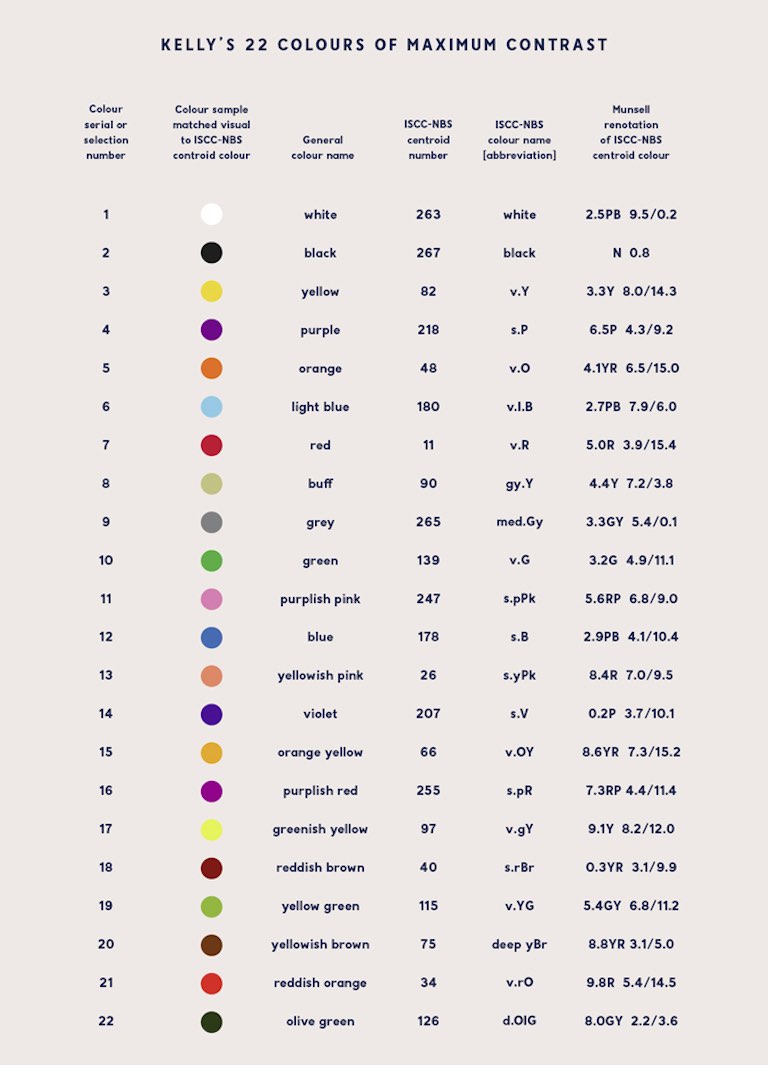
colours and put them in a table (eg., <a href="https://artshacker.com/wp-content/uploads/2014/12/Kellys-22-colour-chart.jpg">1</a> <a href="https://en.wikipedia.org/wiki/Tube_map#Line_colours">2</a> <a href="https://sashamaps.net/docs/resources/20-colors/">3</a>).  But doing things the hard way is more
interesting.  Also, a list which includes both black and white isn’t
solving quite the right problem for this post…</p>

<p>Spoiler alert: this won’t (directly) attempt to address accessibility
for colour-blind users.</p>

<p>I’ve written <a href="/what-ive-learned-so-far-about-web-stuff/">in the past</a> about trying to draw diagrams
and graphs on web pages.  The essential point is that you can embed SVG
with a transparent background but you must use <code>currentColor</code> as the pen
colour when you do this, so that the image is drawn in the same colour
as the text, rather than assuming that the background is always white so
you need to draw black on top.  If you use something like <a href="https://darkreader.org/">Dark
Reader</a> you’ll often see this go awry.</p>

<p>Alternatively you can force the background of the image to be a known
colour, but then on a contrasting background that can still be hard to
look at.</p>

<p>So I know how to draw lines with reasonable contrast from the
background, without assuming that the background will be light or dark.
The next problem is to add to that palette some extra colours which also
contrast with the background but are visibly distinct from each other.
Like three lines on a graph.</p>

<h2 id="single-parameter-variation">Single-parameter variation</h2>

<p>A quick-and-dirty notion of “contrast” is having a different brightness.
Having a different colour but the same brightness can be very hard to
look at.  So for starters, let’s look at just varying the colour while
keeping brightness at a single value chosen to contrast with the text or
the background.</p>

<p>$\frac{n}{\varphi} \mod 1$ has the property that every new $n$ falls
inside one of the largest gaps, and inside the largest span of
contiguous largest gaps (when there are many largest-equal gaps), etc.,
subdividing that gap/span by 1:φ, which is tolerably close to 1:2.</p>

<p>That is to say that each new value is as far as possible from as many
previous values as possible without deciding in advance how many
values you’ll need or changing step sizes at different stages in the
sequence.</p>

<p>Anyway, let’s have a look.  These colours step around the hue of the HSL
space:</p>
<style>
.example {
    display: flex;
    flex-wrap: wrap;
    width: auto;
    height: 90px;
    border: 1px solid;
    overflow: auto;
    resize: both;
}
.example span {
    width: 38px;
    min-height: 30px;
    flex-grow: 1;
    text-align: center;
    line-height: 30px;
    border: .5px solid black;
}
figcaption {
    text-align: center;
    font-family: monospace;
}
</style>

<figure>
<div class="example">
<span style="background: hsl(0deg, 60%, 70%);">0</span>
<span style="background: hsl(222deg, 60%, 70%);">1</span>
<span style="background: hsl(85deg, 60%, 70%);">2</span>
<span style="background: hsl(307deg, 60%, 70%);">3</span>
<span style="background: hsl(170deg, 60%, 70%);">4</span>
<span style="background: hsl(32deg, 60%, 70%);">5</span>
<span style="background: hsl(255deg, 60%, 70%);">6</span>
<span style="background: hsl(117deg, 60%, 70%);">7</span>
<span style="background: hsl(340deg, 60%, 70%);">8</span>
<span style="background: hsl(202deg, 60%, 70%);">9</span>
<span style="background: hsl(65deg, 60%, 70%);">10</span>
<span style="background: hsl(287deg, 60%, 70%);">11</span>
<span style="background: hsl(150deg, 60%, 70%);">12</span>
<span style="background: hsl(12deg, 60%, 70%);">13</span>
<span style="background: hsl(235deg, 60%, 70%);">14</span>
<span style="background: hsl(97deg, 60%, 70%);">15</span>
<span style="background: hsl(320deg, 60%, 70%);">16</span>
<span style="background: hsl(182deg, 60%, 70%);">17</span>
<span style="background: hsl(45deg, 60%, 70%);">18</span>
<span style="background: hsl(267deg, 60%, 70%);">19</span>
<span style="background: hsl(130deg, 60%, 70%);">20</span>
<span style="background: hsl(352deg, 60%, 70%);">21</span>
<span style="background: hsl(215deg, 60%, 70%);">22</span>
<span style="background: hsl(77deg, 60%, 70%);">23</span>
<span style="background: hsl(300deg, 60%, 70%);">24</span>
<span style="background: hsl(162deg, 60%, 70%);">25</span>
<span style="background: hsl(25deg, 60%, 70%);">26</span>
<span style="background: hsl(247deg, 60%, 70%);">27</span>
<span style="background: hsl(110deg, 60%, 70%);">28</span>
<span style="background: hsl(332deg, 60%, 70%);">29</span>
<span style="background: hsl(195deg, 60%, 70%);">30</span>
<span style="background: hsl(57deg, 60%, 70%);">31</span>
<span style="background: hsl(280deg, 60%, 70%);">32</span>
<span style="background: hsl(142deg, 60%, 70%);">33</span>
<span style="background: hsl(5deg, 60%, 70%);">34</span>
<span style="background: hsl(227deg, 60%, 70%);">35</span>
<span style="background: hsl(90deg, 60%, 70%);">36</span>
<span style="background: hsl(312deg, 60%, 70%);">37</span>
<span style="background: hsl(175deg, 60%, 70%);">38</span>
<span style="background: hsl(37deg, 60%, 70%);">39</span>
<span style="background: hsl(260deg, 60%, 70%);">40</span>
<span style="background: hsl(122deg, 60%, 70%);">41</span>
<span style="background: hsl(345deg, 60%, 70%);">42</span>
<span style="background: hsl(207deg, 60%, 70%);">43</span>
<span style="background: hsl(70deg, 60%, 70%);">44</span>
<span style="background: hsl(292deg, 60%, 70%);">45</span>
<span style="background: hsl(155deg, 60%, 70%);">46</span>
<span style="background: hsl(17deg, 60%, 70%);">47</span>
<span style="background: hsl(240deg, 60%, 70%);">48</span>
<span style="background: hsl(102deg, 60%, 70%);">49</span>
<span style="background: hsl(325deg, 60%, 70%);">50</span>
<span style="background: hsl(187deg, 60%, 70%);">51</span>
<span style="background: hsl(50deg, 60%, 70%);">52</span>
<span style="background: hsl(272deg, 60%, 70%);">53</span>
<span style="background: hsl(135deg, 60%, 70%);">54</span>
<span style="background: hsl(357deg, 60%, 70%);">55</span>
<span style="background: hsl(220deg, 60%, 70%);">56</span>
<span style="background: hsl(82deg, 60%, 70%);">57</span>
<span style="background: hsl(305deg, 60%, 70%);">58</span>
<span style="background: hsl(167deg, 60%, 70%);">59</span>
<span style="background: hsl(30deg, 60%, 70%);">60</span>
<span style="background: hsl(252deg, 60%, 70%);">61</span>
<span style="background: hsl(115deg, 60%, 70%);">62</span>
</div>
<figcaption>HSL(n / φ % 1 &times; 360&deg;, 60%, 70%)</figcaption>
</figure>

<p>It’s interactive.  You can resize the box to change the way rows line
up, so you can put different colours next to each other for comparison.</p>

<p>And if you do that you’ll see a problem.  It seems to visit relatively
few colours before coming back around to use something very similar to a
colour that’s already been used.  So things get indistinct much sooner
than one might hope.</p>

<p>Fun fact: When taking steps of 1/φ mod 1 those “kind of similar” colours
occur at distances which are Fibonacci numbers.  Resize the box to have
a Fibonacci number of columns and you’ll see stripes.</p>

<p>HSL is tied to the numerical coding of colour in RGB.  It’s made out of
up and down ramps of R and G and B without regard to how they’re
perceived.  OKLCh, on the other hand, is tied more closely to human
perception.  Maybe that’ll help:</p>

<figure>
<div class="example">
<span style="background: oklch(75% 30% 0deg);">0</span>
<span style="background: oklch(75% 30% 222deg);">1</span>
<span style="background: oklch(75% 30% 85deg);">2</span>
<span style="background: oklch(75% 30% 307deg);">3</span>
<span style="background: oklch(75% 30% 170deg);">4</span>
<span style="background: oklch(75% 30% 32deg);">5</span>
<span style="background: oklch(75% 30% 255deg);">6</span>
<span style="background: oklch(75% 30% 117deg);">7</span>
<span style="background: oklch(75% 30% 340deg);">8</span>
<span style="background: oklch(75% 30% 202deg);">9</span>
<span style="background: oklch(75% 30% 65deg);">10</span>
<span style="background: oklch(75% 30% 287deg);">11</span>
<span style="background: oklch(75% 30% 150deg);">12</span>
<span style="background: oklch(75% 30% 12deg);">13</span>
<span style="background: oklch(75% 30% 235deg);">14</span>
<span style="background: oklch(75% 30% 97deg);">15</span>
<span style="background: oklch(75% 30% 320deg);">16</span>
<span style="background: oklch(75% 30% 182deg);">17</span>
<span style="background: oklch(75% 30% 45deg);">18</span>
<span style="background: oklch(75% 30% 267deg);">19</span>
<span style="background: oklch(75% 30% 130deg);">20</span>
<span style="background: oklch(75% 30% 352deg);">21</span>
<span style="background: oklch(75% 30% 215deg);">22</span>
<span style="background: oklch(75% 30% 77deg);">23</span>
<span style="background: oklch(75% 30% 300deg);">24</span>
<span style="background: oklch(75% 30% 162deg);">25</span>
<span style="background: oklch(75% 30% 25deg);">26</span>
<span style="background: oklch(75% 30% 247deg);">27</span>
<span style="background: oklch(75% 30% 110deg);">28</span>
<span style="background: oklch(75% 30% 332deg);">29</span>
<span style="background: oklch(75% 30% 195deg);">30</span>
<span style="background: oklch(75% 30% 57deg);">31</span>
<span style="background: oklch(75% 30% 280deg);">32</span>
<span style="background: oklch(75% 30% 142deg);">33</span>
<span style="background: oklch(75% 30% 5deg);">34</span>
<span style="background: oklch(75% 30% 227deg);">35</span>
<span style="background: oklch(75% 30% 90deg);">36</span>
<span style="background: oklch(75% 30% 312deg);">37</span>
<span style="background: oklch(75% 30% 175deg);">38</span>
<span style="background: oklch(75% 30% 37deg);">39</span>
<span style="background: oklch(75% 30% 260deg);">40</span>
<span style="background: oklch(75% 30% 122deg);">41</span>
<span style="background: oklch(75% 30% 345deg);">42</span>
<span style="background: oklch(75% 30% 207deg);">43</span>
<span style="background: oklch(75% 30% 70deg);">44</span>
<span style="background: oklch(75% 30% 292deg);">45</span>
<span style="background: oklch(75% 30% 155deg);">46</span>
<span style="background: oklch(75% 30% 17deg);">47</span>
<span style="background: oklch(75% 30% 240deg);">48</span>
<span style="background: oklch(75% 30% 102deg);">49</span>
<span style="background: oklch(75% 30% 325deg);">50</span>
<span style="background: oklch(75% 30% 187deg);">51</span>
<span style="background: oklch(75% 30% 50deg);">52</span>
<span style="background: oklch(75% 30% 272deg);">53</span>
<span style="background: oklch(75% 30% 135deg);">54</span>
<span style="background: oklch(75% 30% 357deg);">55</span>
<span style="background: oklch(75% 30% 220deg);">56</span>
<span style="background: oklch(75% 30% 82deg);">57</span>
<span style="background: oklch(75% 30% 305deg);">58</span>
<span style="background: oklch(75% 30% 167deg);">59</span>
<span style="background: oklch(75% 30% 30deg);">60</span>
<span style="background: oklch(75% 30% 252deg);">61</span>
<span style="background: oklch(75% 30% 115deg);">62</span>
</div>
<figcaption>OKLCh(75% 30% (n / φ % 1 &times; 360&deg;))</figcaption>
</figure>

<p>This has the unfortunate effect (normally a feature) of flattening the
lightness of each colour, so none of the colours are distinguished by
the perceptual lightness variations which would sneak through HSL.
Maybe the hues are more evenly spread, but I can’t see it.</p>

<p>On the positive side, the contrast with the numbers written on the boxes
is more even.  That’s important.</p>

<p>Another problem with OKLCh is that it’s so easy to stumble out of gamut
(the range of colours which the display can represent) and this brings
<a href="https://en.wikipedia.org/wiki/Color_management#Gamut_mapping">gamut mapping</a> into play.  The way to do that is not well defined
right now and it may never be defined in a way that’s useful for these
purposes.  It’s not always obvious how and when the test swatches I’m
using here will be clipped to fit the display capabilities, so it’s hard
to be confident that everybody sees the same thing.</p>

<p>That’s a problem with human perception anyway, but this makes it so much
worse.</p>

<p>But let’s persevere with it a while longer…</p>

<h2 id="multi-parameter-variation">Multi-parameter variation</h2>

<p>Changing just the one parameter doesn’t seem to get us a lot of distinct
choices.  The next thing we can change without interfering with our
fixed brightness constraint is saturation, or C for “chromatic
intensity” in OKLCh.  Alternatively, C represents the distance which the
a (green-red) and b (blue-yellow) values are from 0,0 in OKLab, so we
could vary a and b instead of C and h.</p>

<p>So how do you get the properties of $\frac{n}{\varphi} \mod 1$ in two
dimensions?  It turns out a (the?) <a href="https://extremelearning.com.au/unreasonable-effectiveness-of-quasirandom-sequences/">generalisation</a> takes us to the <a href="https://en.wikipedia.org/wiki/Plastic_ratio">plastic ratio</a> (ρ=1.3247), next.  In
short, multiply $n$ by  (1/ρ, 1/ρ²), or (0.7548776662, 0.5698402910) mod</p>
<ol>
  <li>This maximises the minimum distance between any two points in two
dimensions.</li>
</ol>

<p>Here’s how that looks in OKLab:</p>
<figure>
<div class="example">
<span style="background: oklab(.75 -0.2 -0.2);">0</span>
<span style="background: oklab(.75 0.102 0.028);">1</span>
<span style="background: oklab(.75 0.004 -0.144);">2</span>
<span style="background: oklab(.75 -0.094 0.084);">3</span>
<span style="background: oklab(.75 -0.192 -0.088);">4</span>
<span style="background: oklab(.75 0.11 0.14);">5</span>
<span style="background: oklab(.75 0.012 -0.032);">6</span>
<span style="background: oklab(.75 -0.086 0.196);">7</span>
<span style="background: oklab(.75 -0.184 0.023);">8</span>
<span style="background: oklab(.75 0.118 -0.149);">9</span>
<span style="background: oklab(.75 0.02 0.079);">10</span>
<span style="background: oklab(.75 -0.079 -0.093);">11</span>
<span style="background: oklab(.75 -0.177 0.135);">12</span>
<span style="background: oklab(.75 0.125 -0.037);">13</span>
<span style="background: oklab(.75 0.027 0.191);">14</span>
<span style="background: oklab(.75 -0.071 0.019);">15</span>
<span style="background: oklab(.75 -0.169 -0.153);">16</span>
<span style="background: oklab(.75 0.133 0.075);">17</span>
<span style="background: oklab(.75 0.035 -0.097);">18</span>
<span style="background: oklab(.75 -0.063 0.131);">19</span>
<span style="background: oklab(.75 -0.161 -0.041);">20</span>
<span style="background: oklab(.75 0.141 0.187);">21</span>
<span style="background: oklab(.75 0.043 0.015);">22</span>
<span style="background: oklab(.75 -0.055 -0.157);">23</span>
<span style="background: oklab(.75 -0.153 0.07);">24</span>
<span style="background: oklab(.75 0.149 -0.102);">25</span>
<span style="background: oklab(.75 0.051 0.126);">26</span>
<span style="background: oklab(.75 -0.047 -0.046);">27</span>
<span style="background: oklab(.75 -0.145 0.182);">28</span>
<span style="background: oklab(.75 0.157 0.01);">29</span>
<span style="background: oklab(.75 0.059 -0.162);">30</span>
<span style="background: oklab(.75 -0.04 0.066);">31</span>
<span style="background: oklab(.75 -0.138 -0.106);">32</span>
<span style="background: oklab(.75 0.164 0.122);">33</span>
<span style="background: oklab(.75 0.066 -0.05);">34</span>
<span style="background: oklab(.75 -0.032 0.178);">35</span>
<span style="background: oklab(.75 -0.13 0.006);">36</span>
<span style="background: oklab(.75 0.172 -0.166);">37</span>
<span style="background: oklab(.75 0.074 0.062);">38</span>
<span style="background: oklab(.75 -0.024 -0.11);">39</span>
<span style="background: oklab(.75 -0.122 0.117);">40</span>
<span style="background: oklab(.75 0.18 -0.055);">41</span>
<span style="background: oklab(.75 0.082 0.173);">42</span>
<span style="background: oklab(.75 -0.016 0.001);">43</span>
<span style="background: oklab(.75 -0.114 -0.171);">44</span>
<span style="background: oklab(.75 0.188 0.057);">45</span>
<span style="background: oklab(.75 0.09 -0.115);">46</span>
<span style="background: oklab(.75 -0.008 0.113);">47</span>
<span style="background: oklab(.75 -0.106 -0.059);">48</span>
<span style="background: oklab(.75 0.196 0.169);">49</span>
<span style="background: oklab(.75 0.098 -0.003);">50</span>
<span style="background: oklab(.75 -0.0 -0.175);">51</span>
<span style="background: oklab(.75 -0.099 0.053);">52</span>
<span style="background: oklab(.75 -0.197 -0.119);">53</span>
<span style="background: oklab(.75 0.105 0.109);">54</span>
<span style="background: oklab(.75 0.007 -0.064);">55</span>
<span style="background: oklab(.75 -0.091 0.164);">56</span>
<span style="background: oklab(.75 -0.189 -0.008);">57</span>
<span style="background: oklab(.75 0.113 -0.18);">58</span>
<span style="background: oklab(.75 0.015 0.048);">59</span>
<span style="background: oklab(.75 -0.083 -0.124);">60</span>
<span style="background: oklab(.75 -0.181 0.104);">61</span>
<span style="background: oklab(.75 0.121 -0.068);">62</span>
</div>
<figcaption>OKLab(.75 (n / ρ % 1 &times; .4 - .2) (n / ρ² % 1 &times; .4 - .2))</figcaption>
</figure>

<p>This gives uniform coverage of a square in the chroma plane, so it has
pointy corners where the saturation reaches further out than it can near
the edges.  It’s probably going out of gamut and being clipped in
unpredictable ways.</p>

<p>In another problem space we could use rejection sampling to avoid those
ugly corners, but then we can’t define a colour as a simple function of
$n$.  Instead, a technique to map two uniform random values (a square)
to a uniform distribution over a disc is to take one value as the radius
and the other as an angle around that circle.  Squaring the value used
as radius compensates for the over-concentration of points around the
centre (proof left as an exercise for Google search).</p>

<p>Does this retain the mathematical rigor of low-discrepancy sequences?
No.  Not at all.  But it’s the best I have right now.</p>

<p>And here’s what that gives us for OKLCh:</p>
<figure>
<div class="example">
<span style="background: oklch(.75 calc(sqrt(0.0) * .2) 0deg);">0</span>
<span style="background: oklch(.75 calc(sqrt(0.755) * .2) 205deg);">1</span>
<span style="background: oklch(.75 calc(sqrt(0.51) * .2) 50deg);">2</span>
<span style="background: oklch(.75 calc(sqrt(0.265) * .2) 255deg);">3</span>
<span style="background: oklch(.75 calc(sqrt(0.02) * .2) 101deg);">4</span>
<span style="background: oklch(.75 calc(sqrt(0.774) * .2) 306deg);">5</span>
<span style="background: oklch(.75 calc(sqrt(0.529) * .2) 151deg);">6</span>
<span style="background: oklch(.75 calc(sqrt(0.284) * .2) 356deg);">7</span>
<span style="background: oklch(.75 calc(sqrt(0.039) * .2) 201deg);">8</span>
<span style="background: oklch(.75 calc(sqrt(0.794) * .2) 46deg);">9</span>
<span style="background: oklch(.75 calc(sqrt(0.549) * .2) 251deg);">10</span>
<span style="background: oklch(.75 calc(sqrt(0.304) * .2) 97deg);">11</span>
<span style="background: oklch(.75 calc(sqrt(0.059) * .2) 302deg);">12</span>
<span style="background: oklch(.75 calc(sqrt(0.813) * .2) 147deg);">13</span>
<span style="background: oklch(.75 calc(sqrt(0.568) * .2) 352deg);">14</span>
<span style="background: oklch(.75 calc(sqrt(0.323) * .2) 197deg);">15</span>
<span style="background: oklch(.75 calc(sqrt(0.078) * .2) 42deg);">16</span>
<span style="background: oklch(.75 calc(sqrt(0.833) * .2) 247deg);">17</span>
<span style="background: oklch(.75 calc(sqrt(0.588) * .2) 93deg);">18</span>
<span style="background: oklch(.75 calc(sqrt(0.343) * .2) 298deg);">19</span>
<span style="background: oklch(.75 calc(sqrt(0.098) * .2) 143deg);">20</span>
<span style="background: oklch(.75 calc(sqrt(0.852) * .2) 348deg);">21</span>
<span style="background: oklch(.75 calc(sqrt(0.607) * .2) 193deg);">22</span>
<span style="background: oklch(.75 calc(sqrt(0.362) * .2) 38deg);">23</span>
<span style="background: oklch(.75 calc(sqrt(0.117) * .2) 243deg);">24</span>
<span style="background: oklch(.75 calc(sqrt(0.872) * .2) 89deg);">25</span>
<span style="background: oklch(.75 calc(sqrt(0.627) * .2) 294deg);">26</span>
<span style="background: oklch(.75 calc(sqrt(0.382) * .2) 139deg);">27</span>
<span style="background: oklch(.75 calc(sqrt(0.137) * .2) 344deg);">28</span>
<span style="background: oklch(.75 calc(sqrt(0.891) * .2) 189deg);">29</span>
<span style="background: oklch(.75 calc(sqrt(0.646) * .2) 34deg);">30</span>
<span style="background: oklch(.75 calc(sqrt(0.401) * .2) 239deg);">31</span>
<span style="background: oklch(.75 calc(sqrt(0.156) * .2) 85deg);">32</span>
<span style="background: oklch(.75 calc(sqrt(0.911) * .2) 290deg);">33</span>
<span style="background: oklch(.75 calc(sqrt(0.666) * .2) 135deg);">34</span>
<span style="background: oklch(.75 calc(sqrt(0.421) * .2) 340deg);">35</span>
<span style="background: oklch(.75 calc(sqrt(0.176) * .2) 185deg);">36</span>
<span style="background: oklch(.75 calc(sqrt(0.93) * .2) 30deg);">37</span>
<span style="background: oklch(.75 calc(sqrt(0.685) * .2) 235deg);">38</span>
<span style="background: oklch(.75 calc(sqrt(0.44) * .2) 81deg);">39</span>
<span style="background: oklch(.75 calc(sqrt(0.195) * .2) 286deg);">40</span>
<span style="background: oklch(.75 calc(sqrt(0.95) * .2) 131deg);">41</span>
<span style="background: oklch(.75 calc(sqrt(0.705) * .2) 336deg);">42</span>
<span style="background: oklch(.75 calc(sqrt(0.46) * .2) 181deg);">43</span>
<span style="background: oklch(.75 calc(sqrt(0.215) * .2) 26deg);">44</span>
<span style="background: oklch(.75 calc(sqrt(0.969) * .2) 231deg);">45</span>
<span style="background: oklch(.75 calc(sqrt(0.724) * .2) 77deg);">46</span>
<span style="background: oklch(.75 calc(sqrt(0.479) * .2) 282deg);">47</span>
<span style="background: oklch(.75 calc(sqrt(0.234) * .2) 127deg);">48</span>
<span style="background: oklch(.75 calc(sqrt(0.989) * .2) 332deg);">49</span>
<span style="background: oklch(.75 calc(sqrt(0.744) * .2) 177deg);">50</span>
<span style="background: oklch(.75 calc(sqrt(0.499) * .2) 22deg);">51</span>
<span style="background: oklch(.75 calc(sqrt(0.254) * .2) 227deg);">52</span>
<span style="background: oklch(.75 calc(sqrt(0.009) * .2) 73deg);">53</span>
<span style="background: oklch(.75 calc(sqrt(0.763) * .2) 278deg);">54</span>
<span style="background: oklch(.75 calc(sqrt(0.518) * .2) 123deg);">55</span>
<span style="background: oklch(.75 calc(sqrt(0.273) * .2) 328deg);">56</span>
<span style="background: oklch(.75 calc(sqrt(0.028) * .2) 173deg);">57</span>
<span style="background: oklch(.75 calc(sqrt(0.783) * .2) 18deg);">58</span>
<span style="background: oklch(.75 calc(sqrt(0.538) * .2) 223deg);">59</span>
<span style="background: oklch(.75 calc(sqrt(0.293) * .2) 69deg);">60</span>
<span style="background: oklch(.75 calc(sqrt(0.048) * .2) 274deg);">61</span>
<span style="background: oklch(.75 calc(sqrt(0.802) * .2) 119deg);">62</span>
</div>
<figcaption>OKLCh(.75 (sqrt(n / ρ % 1) &times; .2) (n / ρ² % 1 &times; 360&deg;))</figcaption>
</figure>

<p>Something really unfortunate about the plastic ratio shows up, here.
It’s too close to 4/3.  This has the consequence that one parameter
appears nearly periodic mod 4, with a very slow precession.  For
example, in the polar test case, we start at 0 so the first radius is
zero (grey), and every fourth colour after that is very close to grey as
well, and it takes a long time to climb out of that hole.</p>

<p>By switching the axes around then the problem will manifest in the hue
instead:</p>

<figure>
<div class="example">
<span style="background: oklch(.75 calc(sqrt(0.0) * .2) 0deg);">0</span>
<span style="background: oklch(.75 calc(sqrt(0.57) * .2) 272deg);">1</span>
<span style="background: oklch(.75 calc(sqrt(0.14) * .2) 184deg);">2</span>
<span style="background: oklch(.75 calc(sqrt(0.71) * .2) 95deg);">3</span>
<span style="background: oklch(.75 calc(sqrt(0.279) * .2) 7deg);">4</span>
<span style="background: oklch(.75 calc(sqrt(0.849) * .2) 279deg);">5</span>
<span style="background: oklch(.75 calc(sqrt(0.419) * .2) 191deg);">6</span>
<span style="background: oklch(.75 calc(sqrt(0.989) * .2) 102deg);">7</span>
<span style="background: oklch(.75 calc(sqrt(0.559) * .2) 14deg);">8</span>
<span style="background: oklch(.75 calc(sqrt(0.129) * .2) 286deg);">9</span>
<span style="background: oklch(.75 calc(sqrt(0.698) * .2) 198deg);">10</span>
<span style="background: oklch(.75 calc(sqrt(0.268) * .2) 109deg);">11</span>
<span style="background: oklch(.75 calc(sqrt(0.838) * .2) 21deg);">12</span>
<span style="background: oklch(.75 calc(sqrt(0.408) * .2) 293deg);">13</span>
<span style="background: oklch(.75 calc(sqrt(0.978) * .2) 205deg);">14</span>
<span style="background: oklch(.75 calc(sqrt(0.548) * .2) 116deg);">15</span>
<span style="background: oklch(.75 calc(sqrt(0.117) * .2) 28deg);">16</span>
<span style="background: oklch(.75 calc(sqrt(0.687) * .2) 300deg);">17</span>
<span style="background: oklch(.75 calc(sqrt(0.257) * .2) 212deg);">18</span>
<span style="background: oklch(.75 calc(sqrt(0.827) * .2) 123deg);">19</span>
<span style="background: oklch(.75 calc(sqrt(0.397) * .2) 35deg);">20</span>
<span style="background: oklch(.75 calc(sqrt(0.967) * .2) 307deg);">21</span>
<span style="background: oklch(.75 calc(sqrt(0.536) * .2) 219deg);">22</span>
<span style="background: oklch(.75 calc(sqrt(0.106) * .2) 130deg);">23</span>
<span style="background: oklch(.75 calc(sqrt(0.676) * .2) 42deg);">24</span>
<span style="background: oklch(.75 calc(sqrt(0.246) * .2) 314deg);">25</span>
<span style="background: oklch(.75 calc(sqrt(0.816) * .2) 226deg);">26</span>
<span style="background: oklch(.75 calc(sqrt(0.386) * .2) 137deg);">27</span>
<span style="background: oklch(.75 calc(sqrt(0.956) * .2) 49deg);">28</span>
<span style="background: oklch(.75 calc(sqrt(0.525) * .2) 321deg);">29</span>
<span style="background: oklch(.75 calc(sqrt(0.095) * .2) 233deg);">30</span>
<span style="background: oklch(.75 calc(sqrt(0.665) * .2) 144deg);">31</span>
<span style="background: oklch(.75 calc(sqrt(0.235) * .2) 56deg);">32</span>
<span style="background: oklch(.75 calc(sqrt(0.805) * .2) 328deg);">33</span>
<span style="background: oklch(.75 calc(sqrt(0.375) * .2) 240deg);">34</span>
<span style="background: oklch(.75 calc(sqrt(0.944) * .2) 151deg);">35</span>
<span style="background: oklch(.75 calc(sqrt(0.514) * .2) 63deg);">36</span>
<span style="background: oklch(.75 calc(sqrt(0.084) * .2) 335deg);">37</span>
<span style="background: oklch(.75 calc(sqrt(0.654) * .2) 247deg);">38</span>
<span style="background: oklch(.75 calc(sqrt(0.224) * .2) 158deg);">39</span>
<span style="background: oklch(.75 calc(sqrt(0.794) * .2) 70deg);">40</span>
<span style="background: oklch(.75 calc(sqrt(0.363) * .2) 342deg);">41</span>
<span style="background: oklch(.75 calc(sqrt(0.933) * .2) 254deg);">42</span>
<span style="background: oklch(.75 calc(sqrt(0.503) * .2) 166deg);">43</span>
<span style="background: oklch(.75 calc(sqrt(0.073) * .2) 77deg);">44</span>
<span style="background: oklch(.75 calc(sqrt(0.643) * .2) 349deg);">45</span>
<span style="background: oklch(.75 calc(sqrt(0.213) * .2) 261deg);">46</span>
<span style="background: oklch(.75 calc(sqrt(0.782) * .2) 173deg);">47</span>
<span style="background: oklch(.75 calc(sqrt(0.352) * .2) 84deg);">48</span>
<span style="background: oklch(.75 calc(sqrt(0.922) * .2) 356deg);">49</span>
<span style="background: oklch(.75 calc(sqrt(0.492) * .2) 268deg);">50</span>
<span style="background: oklch(.75 calc(sqrt(0.062) * .2) 180deg);">51</span>
<span style="background: oklch(.75 calc(sqrt(0.632) * .2) 91deg);">52</span>
<span style="background: oklch(.75 calc(sqrt(0.202) * .2) 3deg);">53</span>
<span style="background: oklch(.75 calc(sqrt(0.771) * .2) 275deg);">54</span>
<span style="background: oklch(.75 calc(sqrt(0.341) * .2) 187deg);">55</span>
<span style="background: oklch(.75 calc(sqrt(0.911) * .2) 98deg);">56</span>
<span style="background: oklch(.75 calc(sqrt(0.481) * .2) 10deg);">57</span>
<span style="background: oklch(.75 calc(sqrt(0.051) * .2) 282deg);">58</span>
<span style="background: oklch(.75 calc(sqrt(0.621) * .2) 194deg);">59</span>
<span style="background: oklch(.75 calc(sqrt(0.19) * .2) 105deg);">60</span>
<span style="background: oklch(.75 calc(sqrt(0.76) * .2) 17deg);">61</span>
<span style="background: oklch(.75 calc(sqrt(0.33) * .2) 289deg);">62</span>
</div>
<figcaption>OKLCh(.75 (sqrt(n / ρ² % 1) &times; .2) (n / ρ % 1 &times; 360&deg;))</figcaption>
</figure>

<p>For completeness, let’s also try OKLCh but with fixed C and varying the
lightness instead.</p>

<figure>
<div class="example">
<span style="background: oklch(0.63 .12 0deg);">0</span>
<span style="background: oklch(0.819 .12 205deg);">1</span>
<span style="background: oklch(0.757 .12 50deg);">2</span>
<span style="background: oklch(0.696 .12 255deg);">3</span>
<span style="background: oklch(0.635 .12 101deg);">4</span>
<span style="background: oklch(0.824 .12 306deg);">5</span>
<span style="background: oklch(0.762 .12 151deg);">6</span>
<span style="background: oklch(0.701 .12 356deg);">7</span>
<span style="background: oklch(0.64 .12 201deg);">8</span>
<span style="background: oklch(0.828 .12 46deg);">9</span>
<span style="background: oklch(0.767 .12 251deg);">10</span>
<span style="background: oklch(0.706 .12 97deg);">11</span>
<span style="background: oklch(0.645 .12 302deg);">12</span>
<span style="background: oklch(0.833 .12 147deg);">13</span>
<span style="background: oklch(0.772 .12 352deg);">14</span>
<span style="background: oklch(0.711 .12 197deg);">15</span>
<span style="background: oklch(0.65 .12 42deg);">16</span>
<span style="background: oklch(0.838 .12 247deg);">17</span>
<span style="background: oklch(0.777 .12 93deg);">18</span>
<span style="background: oklch(0.716 .12 298deg);">19</span>
<span style="background: oklch(0.654 .12 143deg);">20</span>
<span style="background: oklch(0.843 .12 348deg);">21</span>
<span style="background: oklch(0.782 .12 193deg);">22</span>
<span style="background: oklch(0.721 .12 38deg);">23</span>
<span style="background: oklch(0.659 .12 243deg);">24</span>
<span style="background: oklch(0.848 .12 89deg);">25</span>
<span style="background: oklch(0.787 .12 294deg);">26</span>
<span style="background: oklch(0.725 .12 139deg);">27</span>
<span style="background: oklch(0.664 .12 344deg);">28</span>
<span style="background: oklch(0.853 .12 189deg);">29</span>
<span style="background: oklch(0.792 .12 34deg);">30</span>
<span style="background: oklch(0.73 .12 239deg);">31</span>
<span style="background: oklch(0.669 .12 85deg);">32</span>
<span style="background: oklch(0.858 .12 290deg);">33</span>
<span style="background: oklch(0.796 .12 135deg);">34</span>
<span style="background: oklch(0.735 .12 340deg);">35</span>
<span style="background: oklch(0.674 .12 185deg);">36</span>
<span style="background: oklch(0.863 .12 30deg);">37</span>
<span style="background: oklch(0.801 .12 235deg);">38</span>
<span style="background: oklch(0.74 .12 81deg);">39</span>
<span style="background: oklch(0.679 .12 286deg);">40</span>
<span style="background: oklch(0.867 .12 131deg);">41</span>
<span style="background: oklch(0.806 .12 336deg);">42</span>
<span style="background: oklch(0.745 .12 181deg);">43</span>
<span style="background: oklch(0.684 .12 26deg);">44</span>
<span style="background: oklch(0.872 .12 231deg);">45</span>
<span style="background: oklch(0.811 .12 77deg);">46</span>
<span style="background: oklch(0.75 .12 282deg);">47</span>
<span style="background: oklch(0.689 .12 127deg);">48</span>
<span style="background: oklch(0.877 .12 332deg);">49</span>
<span style="background: oklch(0.816 .12 177deg);">50</span>
<span style="background: oklch(0.755 .12 22deg);">51</span>
<span style="background: oklch(0.693 .12 227deg);">52</span>
<span style="background: oklch(0.632 .12 73deg);">53</span>
<span style="background: oklch(0.821 .12 278deg);">54</span>
<span style="background: oklch(0.76 .12 123deg);">55</span>
<span style="background: oklch(0.698 .12 328deg);">56</span>
<span style="background: oklch(0.637 .12 173deg);">57</span>
<span style="background: oklch(0.826 .12 18deg);">58</span>
<span style="background: oklch(0.764 .12 223deg);">59</span>
<span style="background: oklch(0.703 .12 69deg);">60</span>
<span style="background: oklch(0.642 .12 274deg);">61</span>
<span style="background: oklch(0.831 .12 119deg);">62</span>
</div>
<figcaption>OKLCh((n/ρ % 1 &times; .25 + .63) .12 (n / ρ² % 1 &times; 360&deg;))</figcaption>
</figure>

<p>Or swapping the axes:</p>

<figure>
<div class="example">
<span style="background: oklch(0.63 .12 0deg);">0</span>
<span style="background: oklch(0.772 .12 272deg);">1</span>
<span style="background: oklch(0.665 .12 184deg);">2</span>
<span style="background: oklch(0.807 .12 95deg);">3</span>
<span style="background: oklch(0.7 .12 7deg);">4</span>
<span style="background: oklch(0.842 .12 279deg);">5</span>
<span style="background: oklch(0.735 .12 191deg);">6</span>
<span style="background: oklch(0.877 .12 102deg);">7</span>
<span style="background: oklch(0.77 .12 14deg);">8</span>
<span style="background: oklch(0.662 .12 286deg);">9</span>
<span style="background: oklch(0.805 .12 198deg);">10</span>
<span style="background: oklch(0.697 .12 109deg);">11</span>
<span style="background: oklch(0.84 .12 21deg);">12</span>
<span style="background: oklch(0.732 .12 293deg);">13</span>
<span style="background: oklch(0.874 .12 205deg);">14</span>
<span style="background: oklch(0.767 .12 116deg);">15</span>
<span style="background: oklch(0.659 .12 28deg);">16</span>
<span style="background: oklch(0.802 .12 300deg);">17</span>
<span style="background: oklch(0.694 .12 212deg);">18</span>
<span style="background: oklch(0.837 .12 123deg);">19</span>
<span style="background: oklch(0.729 .12 35deg);">20</span>
<span style="background: oklch(0.872 .12 307deg);">21</span>
<span style="background: oklch(0.764 .12 219deg);">22</span>
<span style="background: oklch(0.657 .12 130deg);">23</span>
<span style="background: oklch(0.799 .12 42deg);">24</span>
<span style="background: oklch(0.692 .12 314deg);">25</span>
<span style="background: oklch(0.834 .12 226deg);">26</span>
<span style="background: oklch(0.726 .12 137deg);">27</span>
<span style="background: oklch(0.869 .12 49deg);">28</span>
<span style="background: oklch(0.761 .12 321deg);">29</span>
<span style="background: oklch(0.654 .12 233deg);">30</span>
<span style="background: oklch(0.796 .12 144deg);">31</span>
<span style="background: oklch(0.689 .12 56deg);">32</span>
<span style="background: oklch(0.831 .12 328deg);">33</span>
<span style="background: oklch(0.724 .12 240deg);">34</span>
<span style="background: oklch(0.866 .12 151deg);">35</span>
<span style="background: oklch(0.759 .12 63deg);">36</span>
<span style="background: oklch(0.651 .12 335deg);">37</span>
<span style="background: oklch(0.793 .12 247deg);">38</span>
<span style="background: oklch(0.686 .12 158deg);">39</span>
<span style="background: oklch(0.828 .12 70deg);">40</span>
<span style="background: oklch(0.721 .12 342deg);">41</span>
<span style="background: oklch(0.863 .12 254deg);">42</span>
<span style="background: oklch(0.756 .12 166deg);">43</span>
<span style="background: oklch(0.648 .12 77deg);">44</span>
<span style="background: oklch(0.791 .12 349deg);">45</span>
<span style="background: oklch(0.683 .12 261deg);">46</span>
<span style="background: oklch(0.826 .12 173deg);">47</span>
<span style="background: oklch(0.718 .12 84deg);">48</span>
<span style="background: oklch(0.861 .12 356deg);">49</span>
<span style="background: oklch(0.753 .12 268deg);">50</span>
<span style="background: oklch(0.645 .12 180deg);">51</span>
<span style="background: oklch(0.788 .12 91deg);">52</span>
<span style="background: oklch(0.68 .12 3deg);">53</span>
<span style="background: oklch(0.823 .12 275deg);">54</span>
<span style="background: oklch(0.715 .12 187deg);">55</span>
<span style="background: oklch(0.858 .12 98deg);">56</span>
<span style="background: oklch(0.75 .12 10deg);">57</span>
<span style="background: oklch(0.643 .12 282deg);">58</span>
<span style="background: oklch(0.785 .12 194deg);">59</span>
<span style="background: oklch(0.678 .12 105deg);">60</span>
<span style="background: oklch(0.82 .12 17deg);">61</span>
<span style="background: oklch(0.713 .12 289deg);">62</span>
</div>
<figcaption>OKLCh((n/ρ² % 1 &times; .25 + .63) .12 (n / ρ % 1 &times; 360&deg;))</figcaption>
</figure>

<h2 id="varying-all-three-parameters">Varying all three parameters</h2>

<p>Next step is to make adjustments to all three parameters; but only
modest adjustments so that all results still have strong contrast with
the background colour.</p>

<p>I don’t know of a name for what comes after Golden and Plastic, but its
value is g=1.22074408460575947536, and the reciprocals of the powers are
(0.8191725134, 0.6710436067, 0.5497004779).</p>

<p>The lightness figure needs compression to ensure things don’t wander too
far and start failing to meet the original contrast limitation.</p>

<figure>
<div class="example">
<span style="background: oklab(0.63 -0.175 -0.175);">0</span>
<span style="background: oklab(0.835 0.06 0.017);">1</span>
<span style="background: oklab(0.79 -0.055 -0.14);">2</span>
<span style="background: oklab(0.744 -0.17 0.052);">3</span>
<span style="background: oklab(0.699 0.064 -0.105);">4</span>
<span style="background: oklab(0.654 -0.051 0.087);">5</span>
<span style="background: oklab(0.859 -0.166 -0.071);">6</span>
<span style="background: oklab(0.814 0.069 0.122);">7</span>
<span style="background: oklab(0.768 -0.046 -0.036);">8</span>
<span style="background: oklab(0.723 -0.161 0.157);">9</span>
<span style="background: oklab(0.678 0.074 -0.001);">10</span>
<span style="background: oklab(0.633 -0.041 -0.159);">11</span>
<span style="background: oklab(0.838 -0.157 0.034);">12</span>
<span style="background: oklab(0.792 0.078 -0.124);">13</span>
<span style="background: oklab(0.747 -0.037 0.069);">14</span>
<span style="background: oklab(0.702 -0.152 -0.089);">15</span>
<span style="background: oklab(0.657 0.083 0.103);">16</span>
<span style="background: oklab(0.861 -0.032 -0.054);">17</span>
<span style="background: oklab(0.816 -0.147 0.138);">18</span>
<span style="background: oklab(0.771 0.087 -0.019);">19</span>
<span style="background: oklab(0.726 -0.028 0.173);">20</span>
<span style="background: oklab(0.681 -0.143 0.015);">21</span>
<span style="background: oklab(0.635 0.092 -0.142);">22</span>
<span style="background: oklab(0.84 -0.023 0.05);">23</span>
<span style="background: oklab(0.795 -0.138 -0.108);">24</span>
<span style="background: oklab(0.75 0.097 0.085);">25</span>
<span style="background: oklab(0.705 -0.019 -0.073);">26</span>
<span style="background: oklab(0.659 -0.134 0.12);">27</span>
<span style="background: oklab(0.864 0.101 -0.038);">28</span>
<span style="background: oklab(0.819 -0.014 0.154);">29</span>
<span style="background: oklab(0.774 -0.129 -0.003);">30</span>
<span style="background: oklab(0.729 0.106 -0.161);">31</span>
<span style="background: oklab(0.683 -0.009 0.032);">32</span>
<span style="background: oklab(0.638 -0.124 -0.126);">33</span>
<span style="background: oklab(0.843 0.11 0.066);">34</span>
<span style="background: oklab(0.798 -0.005 -0.091);">35</span>
<span style="background: oklab(0.753 -0.12 0.101);">36</span>
<span style="background: oklab(0.707 0.115 -0.056);">37</span>
<span style="background: oklab(0.662 -0.0 0.136);">38</span>
<span style="background: oklab(0.867 -0.115 -0.022);">39</span>
<span style="background: oklab(0.822 0.12 0.171);">40</span>
<span style="background: oklab(0.777 0.004 0.013);">41</span>
<span style="background: oklab(0.731 -0.111 -0.144);">42</span>
<span style="background: oklab(0.686 0.124 0.048);">43</span>
<span style="background: oklab(0.641 0.009 -0.11);">44</span>
<span style="background: oklab(0.846 -0.106 0.083);">45</span>
<span style="background: oklab(0.8 0.129 -0.075);">46</span>
<span style="background: oklab(0.755 0.014 0.118);">47</span>
<span style="background: oklab(0.71 -0.101 -0.04);">48</span>
<span style="background: oklab(0.665 0.133 0.152);">49</span>
<span style="background: oklab(0.87 0.018 -0.005);">50</span>
<span style="background: oklab(0.824 -0.097 -0.163);">51</span>
<span style="background: oklab(0.779 0.138 0.03);">52</span>
<span style="background: oklab(0.734 0.023 -0.128);">53</span>
<span style="background: oklab(0.689 -0.092 0.064);">54</span>
<span style="background: oklab(0.644 0.143 -0.093);">55</span>
<span style="background: oklab(0.848 0.027 0.099);">56</span>
<span style="background: oklab(0.803 -0.088 -0.058);">57</span>
<span style="background: oklab(0.758 0.147 0.134);">58</span>
<span style="background: oklab(0.713 0.032 -0.024);">59</span>
<span style="background: oklab(0.668 -0.083 0.169);">60</span>
<span style="background: oklab(0.872 0.152 0.011);">61</span>
<span style="background: oklab(0.827 0.037 -0.146);">62</span>
</div>
<figcaption>OKLab((n/g % 1 &times; .25 + .63) (n/g² % 1 &times; .35 - .175) (n/g³ % 1 &times; .35 - .175))</figcaption>
</figure>

<p>But I preferred the result with the terms in a different order:</p>

<figure>
<div class="example">
<span style="background: oklab(0.63 -0.175 -0.175);">0</span>
<span style="background: oklab(0.798 0.017 0.112);">1</span>
<span style="background: oklab(0.716 -0.14 0.048);">2</span>
<span style="background: oklab(0.633 0.052 -0.015);">3</span>
<span style="background: oklab(0.801 -0.105 -0.078);">4</span>
<span style="background: oklab(0.719 0.087 -0.141);">5</span>
<span style="background: oklab(0.637 -0.071 0.145);">6</span>
<span style="background: oklab(0.804 0.122 0.082);">7</span>
<span style="background: oklab(0.722 -0.036 0.019);">8</span>
<span style="background: oklab(0.64 0.157 -0.045);">9</span>
<span style="background: oklab(0.808 -0.001 -0.108);">10</span>
<span style="background: oklab(0.725 -0.159 -0.171);">11</span>
<span style="background: oklab(0.643 0.034 0.116);">12</span>
<span style="background: oklab(0.811 -0.124 0.052);">13</span>
<span style="background: oklab(0.729 0.069 -0.011);">14</span>
<span style="background: oklab(0.646 -0.089 -0.074);">15</span>
<span style="background: oklab(0.814 0.103 -0.138);">16</span>
<span style="background: oklab(0.732 -0.054 0.149);">17</span>
<span style="background: oklab(0.65 0.138 0.086);">18</span>
<span style="background: oklab(0.817 -0.019 0.022);">19</span>
<span style="background: oklab(0.735 0.173 -0.041);">20</span>
<span style="background: oklab(0.653 0.015 -0.104);">21</span>
<span style="background: oklab(0.821 -0.142 -0.167);">22</span>
<span style="background: oklab(0.739 0.05 0.119);">23</span>
<span style="background: oklab(0.656 -0.108 0.056);">24</span>
<span style="background: oklab(0.824 0.085 -0.007);">25</span>
<span style="background: oklab(0.742 -0.073 -0.071);">26</span>
<span style="background: oklab(0.66 0.12 -0.134);">27</span>
<span style="background: oklab(0.827 -0.038 0.153);">28</span>
<span style="background: oklab(0.745 0.154 0.09);">29</span>
<span style="background: oklab(0.663 -0.003 0.026);">30</span>
<span style="background: oklab(0.831 -0.161 -0.037);">31</span>
<span style="background: oklab(0.748 0.032 -0.1);">32</span>
<span style="background: oklab(0.666 -0.126 -0.164);">33</span>
<span style="background: oklab(0.834 0.066 0.123);">34</span>
<span style="background: oklab(0.752 -0.091 0.06);">35</span>
<span style="background: oklab(0.669 0.101 -0.003);">36</span>
<span style="background: oklab(0.837 -0.056 -0.067);">37</span>
<span style="background: oklab(0.755 0.136 -0.13);">38</span>
<span style="background: oklab(0.673 -0.022 0.157);">39</span>
<span style="background: oklab(0.84 0.171 0.093);">40</span>
<span style="background: oklab(0.758 0.013 0.03);">41</span>
<span style="background: oklab(0.676 -0.144 -0.033);">42</span>
<span style="background: oklab(0.844 0.048 -0.096);">43</span>
<span style="background: oklab(0.761 -0.11 -0.16);">44</span>
<span style="background: oklab(0.679 0.083 0.127);">45</span>
<span style="background: oklab(0.847 -0.075 0.064);">46</span>
<span style="background: oklab(0.765 0.118 0.0);">47</span>
<span style="background: oklab(0.683 -0.04 -0.063);">48</span>
<span style="background: oklab(0.85 0.152 -0.126);">49</span>
<span style="background: oklab(0.768 -0.005 0.161);">50</span>
<span style="background: oklab(0.686 -0.163 0.097);">51</span>
<span style="background: oklab(0.854 0.03 0.034);">52</span>
<span style="background: oklab(0.771 -0.128 -0.029);">53</span>
<span style="background: oklab(0.689 0.064 -0.093);">54</span>
<span style="background: oklab(0.857 -0.093 -0.156);">55</span>
<span style="background: oklab(0.775 0.099 0.131);">56</span>
<span style="background: oklab(0.692 -0.058 0.067);">57</span>
<span style="background: oklab(0.86 0.134 0.004);">58</span>
<span style="background: oklab(0.778 -0.024 -0.059);">59</span>
<span style="background: oklab(0.696 0.169 -0.122);">60</span>
<span style="background: oklab(0.863 0.011 0.164);">61</span>
<span style="background: oklab(0.781 -0.146 0.101);">62</span>
</div>
<figcaption>OKLab((n/g² % 1 &times; .25 + .63) (n/g³ % 1 &times; .35 - .175) (n/g % 1 &times; .35 - .175))</figcaption>
</figure>

<p>I wasn’t sure about the appropriateness of compressing an axis of an
LDS the way I was doing it, so I tried using a smaller modulo instead:</p>

<figure>
<div class="example">
<span style="background: oklab(0.63 -0.175 -0.175);">0</span>
<span style="background: oklab(0.801 0.017 0.112);">1</span>
<span style="background: oklab(0.722 -0.14 0.048);">2</span>
<span style="background: oklab(0.643 0.052 -0.015);">3</span>
<span style="background: oklab(0.814 -0.105 -0.078);">4</span>
<span style="background: oklab(0.735 0.087 -0.141);">5</span>
<span style="background: oklab(0.656 -0.071 0.145);">6</span>
<span style="background: oklab(0.827 0.122 0.082);">7</span>
<span style="background: oklab(0.748 -0.036 0.019);">8</span>
<span style="background: oklab(0.669 0.157 -0.045);">9</span>
<span style="background: oklab(0.84 -0.001 -0.108);">10</span>
<span style="background: oklab(0.761 -0.159 -0.171);">11</span>
<span style="background: oklab(0.683 0.034 0.116);">12</span>
<span style="background: oklab(0.854 -0.124 0.052);">13</span>
<span style="background: oklab(0.775 0.069 -0.011);">14</span>
<span style="background: oklab(0.696 -0.089 -0.074);">15</span>
<span style="background: oklab(0.867 0.103 -0.138);">16</span>
<span style="background: oklab(0.788 -0.054 0.149);">17</span>
<span style="background: oklab(0.709 0.138 0.086);">18</span>
<span style="background: oklab(0.88 -0.019 0.022);">19</span>
<span style="background: oklab(0.801 0.173 -0.041);">20</span>
<span style="background: oklab(0.722 0.015 -0.104);">21</span>
<span style="background: oklab(0.643 -0.142 -0.167);">22</span>
<span style="background: oklab(0.814 0.05 0.119);">23</span>
<span style="background: oklab(0.735 -0.108 0.056);">24</span>
<span style="background: oklab(0.656 0.085 -0.007);">25</span>
<span style="background: oklab(0.827 -0.073 -0.071);">26</span>
<span style="background: oklab(0.748 0.12 -0.134);">27</span>
<span style="background: oklab(0.669 -0.038 0.153);">28</span>
<span style="background: oklab(0.84 0.154 0.09);">29</span>
<span style="background: oklab(0.761 -0.003 0.026);">30</span>
<span style="background: oklab(0.682 -0.161 -0.037);">31</span>
<span style="background: oklab(0.853 0.032 -0.1);">32</span>
<span style="background: oklab(0.774 -0.126 -0.164);">33</span>
<span style="background: oklab(0.695 0.066 0.123);">34</span>
<span style="background: oklab(0.867 -0.091 0.06);">35</span>
<span style="background: oklab(0.788 0.101 -0.003);">36</span>
<span style="background: oklab(0.709 -0.056 -0.067);">37</span>
<span style="background: oklab(0.88 0.136 -0.13);">38</span>
<span style="background: oklab(0.801 -0.022 0.157);">39</span>
<span style="background: oklab(0.722 0.171 0.093);">40</span>
<span style="background: oklab(0.643 0.013 0.03);">41</span>
<span style="background: oklab(0.814 -0.144 -0.033);">42</span>
<span style="background: oklab(0.735 0.048 -0.096);">43</span>
<span style="background: oklab(0.656 -0.11 -0.16);">44</span>
<span style="background: oklab(0.827 0.083 0.127);">45</span>
<span style="background: oklab(0.748 -0.075 0.064);">46</span>
<span style="background: oklab(0.669 0.118 0.0);">47</span>
<span style="background: oklab(0.84 -0.04 -0.063);">48</span>
<span style="background: oklab(0.761 0.152 -0.126);">49</span>
<span style="background: oklab(0.682 -0.005 0.161);">50</span>
<span style="background: oklab(0.853 -0.163 0.097);">51</span>
<span style="background: oklab(0.774 0.03 0.034);">52</span>
<span style="background: oklab(0.695 -0.128 -0.029);">53</span>
<span style="background: oklab(0.866 0.064 -0.093);">54</span>
<span style="background: oklab(0.787 -0.093 -0.156);">55</span>
<span style="background: oklab(0.708 0.099 0.131);">56</span>
<span style="background: oklab(0.879 -0.058 0.067);">57</span>
<span style="background: oklab(0.801 0.134 0.004);">58</span>
<span style="background: oklab(0.722 -0.024 -0.059);">59</span>
<span style="background: oklab(0.643 0.169 -0.122);">60</span>
<span style="background: oklab(0.814 0.011 0.164);">61</span>
<span style="background: oklab(0.735 -0.146 0.101);">62</span>
</div>
<figcaption>OKLab((n/g² % .25 + .63) (n/g³ % 1 &times; .35 - .175) (n/g % 1 &times; .35 - .175))</figcaption>
</figure>

<p>but this version becomes distinctly worse at intervals of 22.  Which is
respectable, but it’s not as good as the previous version.</p>

<p>Those are all OKLab, so they have pointy saturation corners – though I
did reduce the range a little to compensate.  Let’s try another OKLCh:</p>

<figure>
<div class="example">
<span style="background: oklch(0.63 calc(sqrt(0.0) * 0.2) 0);">0</span>
<span style="background: oklch(0.798 calc(sqrt(0.55) * 0.2) 295);">1</span>
<span style="background: oklch(0.716 calc(sqrt(0.099) * 0.2) 230);">2</span>
<span style="background: oklch(0.633 calc(sqrt(0.649) * 0.2) 165);">3</span>
<span style="background: oklch(0.801 calc(sqrt(0.199) * 0.2) 100);">4</span>
<span style="background: oklch(0.719 calc(sqrt(0.749) * 0.2) 35);">5</span>
<span style="background: oklch(0.637 calc(sqrt(0.298) * 0.2) 329);">6</span>
<span style="background: oklch(0.804 calc(sqrt(0.848) * 0.2) 264);">7</span>
<span style="background: oklch(0.722 calc(sqrt(0.398) * 0.2) 199);">8</span>
<span style="background: oklch(0.64 calc(sqrt(0.947) * 0.2) 134);">9</span>
<span style="background: oklch(0.808 calc(sqrt(0.497) * 0.2) 69);">10</span>
<span style="background: oklch(0.725 calc(sqrt(0.047) * 0.2) 4);">11</span>
<span style="background: oklch(0.643 calc(sqrt(0.596) * 0.2) 299);">12</span>
<span style="background: oklch(0.811 calc(sqrt(0.146) * 0.2) 234);">13</span>
<span style="background: oklch(0.729 calc(sqrt(0.696) * 0.2) 169);">14</span>
<span style="background: oklch(0.646 calc(sqrt(0.246) * 0.2) 104);">15</span>
<span style="background: oklch(0.814 calc(sqrt(0.795) * 0.2) 38);">16</span>
<span style="background: oklch(0.732 calc(sqrt(0.345) * 0.2) 333);">17</span>
<span style="background: oklch(0.65 calc(sqrt(0.895) * 0.2) 268);">18</span>
<span style="background: oklch(0.817 calc(sqrt(0.444) * 0.2) 203);">19</span>
<span style="background: oklch(0.735 calc(sqrt(0.994) * 0.2) 138);">20</span>
<span style="background: oklch(0.653 calc(sqrt(0.544) * 0.2) 73);">21</span>
<span style="background: oklch(0.821 calc(sqrt(0.093) * 0.2) 8);">22</span>
<span style="background: oklch(0.739 calc(sqrt(0.643) * 0.2) 303);">23</span>
<span style="background: oklch(0.656 calc(sqrt(0.193) * 0.2) 238);">24</span>
<span style="background: oklch(0.824 calc(sqrt(0.743) * 0.2) 173);">25</span>
<span style="background: oklch(0.742 calc(sqrt(0.292) * 0.2) 107);">26</span>
<span style="background: oklch(0.66 calc(sqrt(0.842) * 0.2) 42);">27</span>
<span style="background: oklch(0.827 calc(sqrt(0.392) * 0.2) 337);">28</span>
<span style="background: oklch(0.745 calc(sqrt(0.941) * 0.2) 272);">29</span>
<span style="background: oklch(0.663 calc(sqrt(0.491) * 0.2) 207);">30</span>
<span style="background: oklch(0.831 calc(sqrt(0.041) * 0.2) 142);">31</span>
<span style="background: oklch(0.748 calc(sqrt(0.59) * 0.2) 77);">32</span>
<span style="background: oklch(0.666 calc(sqrt(0.14) * 0.2) 12);">33</span>
<span style="background: oklch(0.834 calc(sqrt(0.69) * 0.2) 307);">34</span>
<span style="background: oklch(0.752 calc(sqrt(0.24) * 0.2) 242);">35</span>
<span style="background: oklch(0.669 calc(sqrt(0.789) * 0.2) 176);">36</span>
<span style="background: oklch(0.837 calc(sqrt(0.339) * 0.2) 111);">37</span>
<span style="background: oklch(0.755 calc(sqrt(0.889) * 0.2) 46);">38</span>
<span style="background: oklch(0.673 calc(sqrt(0.438) * 0.2) 341);">39</span>
<span style="background: oklch(0.84 calc(sqrt(0.988) * 0.2) 276);">40</span>
<span style="background: oklch(0.758 calc(sqrt(0.538) * 0.2) 211);">41</span>
<span style="background: oklch(0.676 calc(sqrt(0.087) * 0.2) 146);">42</span>
<span style="background: oklch(0.844 calc(sqrt(0.637) * 0.2) 81);">43</span>
<span style="background: oklch(0.761 calc(sqrt(0.187) * 0.2) 16);">44</span>
<span style="background: oklch(0.679 calc(sqrt(0.737) * 0.2) 311);">45</span>
<span style="background: oklch(0.847 calc(sqrt(0.286) * 0.2) 245);">46</span>
<span style="background: oklch(0.765 calc(sqrt(0.836) * 0.2) 180);">47</span>
<span style="background: oklch(0.683 calc(sqrt(0.386) * 0.2) 115);">48</span>
<span style="background: oklch(0.85 calc(sqrt(0.935) * 0.2) 50);">49</span>
<span style="background: oklch(0.768 calc(sqrt(0.485) * 0.2) 345);">50</span>
<span style="background: oklch(0.686 calc(sqrt(0.035) * 0.2) 280);">51</span>
<span style="background: oklch(0.854 calc(sqrt(0.584) * 0.2) 215);">52</span>
<span style="background: oklch(0.771 calc(sqrt(0.134) * 0.2) 150);">53</span>
<span style="background: oklch(0.689 calc(sqrt(0.684) * 0.2) 85);">54</span>
<span style="background: oklch(0.857 calc(sqrt(0.234) * 0.2) 20);">55</span>
<span style="background: oklch(0.775 calc(sqrt(0.783) * 0.2) 315);">56</span>
<span style="background: oklch(0.692 calc(sqrt(0.333) * 0.2) 249);">57</span>
<span style="background: oklch(0.86 calc(sqrt(0.883) * 0.2) 184);">58</span>
<span style="background: oklch(0.778 calc(sqrt(0.432) * 0.2) 119);">59</span>
<span style="background: oklch(0.696 calc(sqrt(0.982) * 0.2) 54);">60</span>
<span style="background: oklch(0.863 calc(sqrt(0.532) * 0.2) 349);">61</span>
<span style="background: oklch(0.781 calc(sqrt(0.081) * 0.2) 284);">62</span>
</div>
<figcaption>OKLCh((n/g² % 1 &times; .25 + .63) (sqrt(n/g³ % 1) &times; .2) (n/g % 1 &times; 360&deg;))</figcaption>
</figure>

<p>And back to HSL:</p>

<figure>
<div class="example">
<span style="background: hsl(0deg, calc(sqrt(0.0) * 70%), 55%);">0</span>
<span style="background: hsl(295deg, calc(sqrt(0.55) * 70%), 72%);">1</span>
<span style="background: hsl(230deg, calc(sqrt(0.099) * 70%), 64%);">2</span>
<span style="background: hsl(165deg, calc(sqrt(0.649) * 70%), 55%);">3</span>
<span style="background: hsl(100deg, calc(sqrt(0.199) * 70%), 72%);">4</span>
<span style="background: hsl(35deg, calc(sqrt(0.749) * 70%), 64%);">5</span>
<span style="background: hsl(329deg, calc(sqrt(0.298) * 70%), 56%);">6</span>
<span style="background: hsl(264deg, calc(sqrt(0.848) * 70%), 72%);">7</span>
<span style="background: hsl(199deg, calc(sqrt(0.398) * 70%), 64%);">8</span>
<span style="background: hsl(134deg, calc(sqrt(0.947) * 70%), 56%);">9</span>
<span style="background: hsl(69deg, calc(sqrt(0.497) * 70%), 73%);">10</span>
<span style="background: hsl(4deg, calc(sqrt(0.047) * 70%), 65%);">11</span>
<span style="background: hsl(299deg, calc(sqrt(0.596) * 70%), 56%);">12</span>
<span style="background: hsl(234deg, calc(sqrt(0.146) * 70%), 73%);">13</span>
<span style="background: hsl(169deg, calc(sqrt(0.696) * 70%), 65%);">14</span>
<span style="background: hsl(104deg, calc(sqrt(0.246) * 70%), 57%);">15</span>
<span style="background: hsl(38deg, calc(sqrt(0.795) * 70%), 73%);">16</span>
<span style="background: hsl(333deg, calc(sqrt(0.345) * 70%), 65%);">17</span>
<span style="background: hsl(268deg, calc(sqrt(0.895) * 70%), 57%);">18</span>
<span style="background: hsl(203deg, calc(sqrt(0.444) * 70%), 74%);">19</span>
<span style="background: hsl(138deg, calc(sqrt(0.994) * 70%), 66%);">20</span>
<span style="background: hsl(73deg, calc(sqrt(0.544) * 70%), 57%);">21</span>
<span style="background: hsl(8deg, calc(sqrt(0.093) * 70%), 74%);">22</span>
<span style="background: hsl(303deg, calc(sqrt(0.643) * 70%), 66%);">23</span>
<span style="background: hsl(238deg, calc(sqrt(0.193) * 70%), 58%);">24</span>
<span style="background: hsl(173deg, calc(sqrt(0.743) * 70%), 74%);">25</span>
<span style="background: hsl(107deg, calc(sqrt(0.292) * 70%), 66%);">26</span>
<span style="background: hsl(42deg, calc(sqrt(0.842) * 70%), 58%);">27</span>
<span style="background: hsl(337deg, calc(sqrt(0.392) * 70%), 75%);">28</span>
<span style="background: hsl(272deg, calc(sqrt(0.941) * 70%), 67%);">29</span>
<span style="background: hsl(207deg, calc(sqrt(0.491) * 70%), 58%);">30</span>
<span style="background: hsl(142deg, calc(sqrt(0.041) * 70%), 75%);">31</span>
<span style="background: hsl(77deg, calc(sqrt(0.59) * 70%), 67%);">32</span>
<span style="background: hsl(12deg, calc(sqrt(0.14) * 70%), 59%);">33</span>
<span style="background: hsl(307deg, calc(sqrt(0.69) * 70%), 75%);">34</span>
<span style="background: hsl(242deg, calc(sqrt(0.24) * 70%), 67%);">35</span>
<span style="background: hsl(176deg, calc(sqrt(0.789) * 70%), 59%);">36</span>
<span style="background: hsl(111deg, calc(sqrt(0.339) * 70%), 76%);">37</span>
<span style="background: hsl(46deg, calc(sqrt(0.889) * 70%), 67%);">38</span>
<span style="background: hsl(341deg, calc(sqrt(0.438) * 70%), 59%);">39</span>
<span style="background: hsl(276deg, calc(sqrt(0.988) * 70%), 76%);">40</span>
<span style="background: hsl(211deg, calc(sqrt(0.538) * 70%), 68%);">41</span>
<span style="background: hsl(146deg, calc(sqrt(0.087) * 70%), 60%);">42</span>
<span style="background: hsl(81deg, calc(sqrt(0.637) * 70%), 76%);">43</span>
<span style="background: hsl(16deg, calc(sqrt(0.187) * 70%), 68%);">44</span>
<span style="background: hsl(311deg, calc(sqrt(0.737) * 70%), 60%);">45</span>
<span style="background: hsl(245deg, calc(sqrt(0.286) * 70%), 77%);">46</span>
<span style="background: hsl(180deg, calc(sqrt(0.836) * 70%), 68%);">47</span>
<span style="background: hsl(115deg, calc(sqrt(0.386) * 70%), 60%);">48</span>
<span style="background: hsl(50deg, calc(sqrt(0.935) * 70%), 77%);">49</span>
<span style="background: hsl(345deg, calc(sqrt(0.485) * 70%), 69%);">50</span>
<span style="background: hsl(280deg, calc(sqrt(0.035) * 70%), 61%);">51</span>
<span style="background: hsl(215deg, calc(sqrt(0.584) * 70%), 77%);">52</span>
<span style="background: hsl(150deg, calc(sqrt(0.134) * 70%), 69%);">53</span>
<span style="background: hsl(85deg, calc(sqrt(0.684) * 70%), 61%);">54</span>
<span style="background: hsl(20deg, calc(sqrt(0.234) * 70%), 78%);">55</span>
<span style="background: hsl(315deg, calc(sqrt(0.783) * 70%), 69%);">56</span>
<span style="background: hsl(249deg, calc(sqrt(0.333) * 70%), 61%);">57</span>
<span style="background: hsl(184deg, calc(sqrt(0.883) * 70%), 78%);">58</span>
<span style="background: hsl(119deg, calc(sqrt(0.432) * 70%), 70%);">59</span>
<span style="background: hsl(54deg, calc(sqrt(0.982) * 70%), 62%);">60</span>
<span style="background: hsl(349deg, calc(sqrt(0.532) * 70%), 78%);">61</span>
<span style="background: hsl(284deg, calc(sqrt(0.081) * 70%), 70%);">62</span>
</div>
<figcaption>HSL((n/g % 1 &times; 360&deg;), (sqrt(n/g³ % 1) &times; 70%), (n/g² % 1 &times; 25% + 55%))</figcaption>
</figure>

<p>And HSL with the axes rearranged:</p>

<figure>
<div class="example">
<span style="background: hsl(0deg, calc(sqrt(0.0) * 70%), 55%);">0</span>
<span style="background: hsl(198deg, calc(sqrt(0.819) * 70%), 72%);">1</span>
<span style="background: hsl(36deg, calc(sqrt(0.638) * 70%), 64%);">2</span>
<span style="background: hsl(234deg, calc(sqrt(0.458) * 70%), 55%);">3</span>
<span style="background: hsl(72deg, calc(sqrt(0.277) * 70%), 72%);">4</span>
<span style="background: hsl(269deg, calc(sqrt(0.096) * 70%), 64%);">5</span>
<span style="background: hsl(107deg, calc(sqrt(0.915) * 70%), 56%);">6</span>
<span style="background: hsl(305deg, calc(sqrt(0.734) * 70%), 72%);">7</span>
<span style="background: hsl(143deg, calc(sqrt(0.553) * 70%), 64%);">8</span>
<span style="background: hsl(341deg, calc(sqrt(0.373) * 70%), 56%);">9</span>
<span style="background: hsl(179deg, calc(sqrt(0.192) * 70%), 73%);">10</span>
<span style="background: hsl(17deg, calc(sqrt(0.011) * 70%), 65%);">11</span>
<span style="background: hsl(215deg, calc(sqrt(0.83) * 70%), 56%);">12</span>
<span style="background: hsl(53deg, calc(sqrt(0.649) * 70%), 73%);">13</span>
<span style="background: hsl(250deg, calc(sqrt(0.468) * 70%), 65%);">14</span>
<span style="background: hsl(88deg, calc(sqrt(0.288) * 70%), 57%);">15</span>
<span style="background: hsl(286deg, calc(sqrt(0.107) * 70%), 73%);">16</span>
<span style="background: hsl(124deg, calc(sqrt(0.926) * 70%), 65%);">17</span>
<span style="background: hsl(322deg, calc(sqrt(0.745) * 70%), 57%);">18</span>
<span style="background: hsl(160deg, calc(sqrt(0.564) * 70%), 74%);">19</span>
<span style="background: hsl(358deg, calc(sqrt(0.383) * 70%), 66%);">20</span>
<span style="background: hsl(196deg, calc(sqrt(0.203) * 70%), 57%);">21</span>
<span style="background: hsl(34deg, calc(sqrt(0.022) * 70%), 74%);">22</span>
<span style="background: hsl(232deg, calc(sqrt(0.841) * 70%), 66%);">23</span>
<span style="background: hsl(69deg, calc(sqrt(0.66) * 70%), 58%);">24</span>
<span style="background: hsl(267deg, calc(sqrt(0.479) * 70%), 74%);">25</span>
<span style="background: hsl(105deg, calc(sqrt(0.298) * 70%), 66%);">26</span>
<span style="background: hsl(303deg, calc(sqrt(0.118) * 70%), 58%);">27</span>
<span style="background: hsl(141deg, calc(sqrt(0.937) * 70%), 75%);">28</span>
<span style="background: hsl(339deg, calc(sqrt(0.756) * 70%), 67%);">29</span>
<span style="background: hsl(177deg, calc(sqrt(0.575) * 70%), 58%);">30</span>
<span style="background: hsl(15deg, calc(sqrt(0.394) * 70%), 75%);">31</span>
<span style="background: hsl(213deg, calc(sqrt(0.214) * 70%), 67%);">32</span>
<span style="background: hsl(50deg, calc(sqrt(0.033) * 70%), 59%);">33</span>
<span style="background: hsl(248deg, calc(sqrt(0.852) * 70%), 75%);">34</span>
<span style="background: hsl(86deg, calc(sqrt(0.671) * 70%), 67%);">35</span>
<span style="background: hsl(284deg, calc(sqrt(0.49) * 70%), 59%);">36</span>
<span style="background: hsl(122deg, calc(sqrt(0.309) * 70%), 76%);">37</span>
<span style="background: hsl(320deg, calc(sqrt(0.129) * 70%), 67%);">38</span>
<span style="background: hsl(158deg, calc(sqrt(0.948) * 70%), 59%);">39</span>
<span style="background: hsl(356deg, calc(sqrt(0.767) * 70%), 76%);">40</span>
<span style="background: hsl(194deg, calc(sqrt(0.586) * 70%), 68%);">41</span>
<span style="background: hsl(31deg, calc(sqrt(0.405) * 70%), 60%);">42</span>
<span style="background: hsl(229deg, calc(sqrt(0.224) * 70%), 76%);">43</span>
<span style="background: hsl(67deg, calc(sqrt(0.044) * 70%), 68%);">44</span>
<span style="background: hsl(265deg, calc(sqrt(0.863) * 70%), 60%);">45</span>
<span style="background: hsl(103deg, calc(sqrt(0.682) * 70%), 77%);">46</span>
<span style="background: hsl(301deg, calc(sqrt(0.501) * 70%), 68%);">47</span>
<span style="background: hsl(139deg, calc(sqrt(0.32) * 70%), 60%);">48</span>
<span style="background: hsl(337deg, calc(sqrt(0.139) * 70%), 77%);">49</span>
<span style="background: hsl(175deg, calc(sqrt(0.959) * 70%), 69%);">50</span>
<span style="background: hsl(13deg, calc(sqrt(0.778) * 70%), 61%);">51</span>
<span style="background: hsl(210deg, calc(sqrt(0.597) * 70%), 77%);">52</span>
<span style="background: hsl(48deg, calc(sqrt(0.416) * 70%), 69%);">53</span>
<span style="background: hsl(246deg, calc(sqrt(0.235) * 70%), 61%);">54</span>
<span style="background: hsl(84deg, calc(sqrt(0.054) * 70%), 78%);">55</span>
<span style="background: hsl(282deg, calc(sqrt(0.874) * 70%), 69%);">56</span>
<span style="background: hsl(120deg, calc(sqrt(0.693) * 70%), 61%);">57</span>
<span style="background: hsl(318deg, calc(sqrt(0.512) * 70%), 78%);">58</span>
<span style="background: hsl(156deg, calc(sqrt(0.331) * 70%), 70%);">59</span>
<span style="background: hsl(354deg, calc(sqrt(0.15) * 70%), 62%);">60</span>
<span style="background: hsl(191deg, calc(sqrt(0.97) * 70%), 78%);">61</span>
<span style="background: hsl(29deg, calc(sqrt(0.789) * 70%), 70%);">62</span>
</div>
<figcaption>HSL((n/g³ % 1 &times; 360&deg;), (sqrt(n/g % 1) &times; 70%), (n/g² % 1 &times; 25% + 55%))</figcaption>
</figure>

<p>So many choices… also, you can add some arbitrary starting value to
pick a handful of colours you like the look of, and the subsequent
colours will only come up in extreme cases.</p>

<h2 id="putting-it-into-context">Putting it into context</h2>

<p>Given some function or other to turn an index into a colour, that colour
still has to make sense for the way it’s being used.  Coloured lines
want contrast with the background while being distinguishable from each
other, but if you fill in a box you probably want that fill to have
contrast with any text that goes inside, so it should be close to the
background colour.</p>

<p>In my totally unscientific tinkering I’ve found that low-saturation
light colours (pastels) work well for lines on dark backgrounds and for
fill colours behind dark text, and that high-saturation dark colours
(“deep” colours) work well well for lines on light backgrounds and fill
colours behind light text.</p>

<p>Also, fills turn out to be easier to distinguish from each other than
lines, so lines might need their saturation amplified a bit to
compensate.  Maybe.  I don’t want to go that deep right now.</p>

<p>All that said; one should have other means to distinguish things because
not everybody sees colour the same way.</p>

<h2 id="code-plz">Code plz!</h2>

<p>In CSS you can deduce a contrasting background colour with something
like: <code>HSL(from currentColor 0, 0, clamp(0, l * -100 + 50, 1))</code> This
negates the luminance and amplifies 100-fold so as to hit the limits
imposed by <code>clamp()</code> right away.  Resulting in either black or white
being chosen.</p>

<p>One can also deduce that a low saturation might be desired when
<code>currentColor</code> has a low lightness value, and high saturation is desired
when <code>currentColor</code> has a high lightness value.</p>

<p>It’s easier to do this in two steps, first making a “mask” colour, and
then using that mask as the basis for palette colours:</p>
<div class="language-css highlighter-rouge"><div class="highlight"><pre class="highlight"><code><span class="o">*</span> <span class="p">{</span>
  <span class="py">--stroke-mask</span><span class="p">:</span> <span class="n">oklab</span><span class="p">(</span><span class="n">from</span> <span class="n">currentColor</span>
      <span class="n">clamp</span><span class="p">(</span><span class="m">.40</span><span class="p">,</span> <span class="n">l</span> <span class="err">*</span>  <span class="m">100</span> <span class="n">-</span> <span class="m">50</span><span class="p">,</span> <span class="m">.9</span><span class="p">)</span>
      <span class="n">clamp</span><span class="p">(</span><span class="m">.15</span><span class="p">,</span> <span class="n">l</span> <span class="err">*</span> <span class="m">-100</span> <span class="err">+</span> <span class="m">50</span><span class="p">,</span> <span class="m">.3</span><span class="p">)</span>
      <span class="n">clamp</span><span class="p">(</span><span class="m">.15</span><span class="p">,</span> <span class="n">l</span> <span class="err">*</span> <span class="m">-100</span> <span class="err">+</span> <span class="m">50</span><span class="p">,</span> <span class="m">.3</span><span class="p">));</span>
  <span class="py">--fill-mask</span><span class="p">:</span> <span class="n">oklab</span><span class="p">(</span><span class="n">from</span> <span class="n">currentColor</span>
      <span class="n">clamp</span><span class="p">(</span><span class="m">.40</span><span class="p">,</span> <span class="n">l</span> <span class="err">*</span> <span class="m">-100</span> <span class="err">+</span> <span class="m">50</span><span class="p">,</span> <span class="m">.9</span><span class="p">)</span>
      <span class="n">clamp</span><span class="p">(</span><span class="m">.15</span><span class="p">,</span> <span class="n">l</span> <span class="err">*</span>  <span class="m">100</span> <span class="n">-</span> <span class="m">50</span><span class="p">,</span> <span class="m">.3</span><span class="p">)</span>
      <span class="n">clamp</span><span class="p">(</span><span class="m">.15</span><span class="p">,</span> <span class="n">l</span> <span class="err">*</span>  <span class="m">100</span> <span class="n">-</span> <span class="m">50</span><span class="p">,</span> <span class="m">.3</span><span class="p">))</span>

  <span class="n">--colour-stroke</span><span class="p">:</span> <span class="n">oklab</span><span class="p">(</span><span class="n">from</span> <span class="n">var</span><span class="p">(</span><span class="n">--stroke-mask</span><span class="p">)</span>
    <span class="n">calc</span><span class="p">(</span><span class="n">calc</span><span class="p">(</span><span class="n">mod</span><span class="p">(</span><span class="m">.6710436067</span> <span class="err">*</span> <span class="n">var</span><span class="p">(</span><span class="n">--n</span><span class="p">),</span> <span class="m">1</span><span class="p">)</span> <span class="n">-</span> <span class="n">l</span><span class="p">)</span> <span class="err">*</span> <span class="m">.25</span> <span class="err">+</span> <span class="n">l</span><span class="p">)</span>
    <span class="n">calc</span><span class="p">(</span><span class="n">calc</span><span class="p">(</span><span class="n">mod</span><span class="p">(</span><span class="m">.5497004779</span> <span class="err">*</span> <span class="n">var</span><span class="p">(</span><span class="n">--n</span><span class="p">),</span> <span class="m">1</span><span class="p">)</span> <span class="n">-</span> <span class="m">0.5</span><span class="p">)</span> <span class="err">*</span> <span class="n">a</span><span class="p">)</span>
    <span class="n">calc</span><span class="p">(</span><span class="n">calc</span><span class="p">(</span><span class="n">mod</span><span class="p">(</span><span class="m">.8191725134</span> <span class="err">*</span> <span class="n">var</span><span class="p">(</span><span class="n">--n</span><span class="p">),</span> <span class="m">1</span><span class="p">)</span> <span class="n">-</span> <span class="m">0.5</span><span class="p">)</span> <span class="err">*</span> <span class="n">b</span><span class="p">));</span>
  <span class="py">--colour-fill</span><span class="p">:</span> <span class="n">oklab</span><span class="p">(</span><span class="n">from</span> <span class="n">var</span><span class="p">(</span><span class="n">--fill-mask</span><span class="p">)</span>
    <span class="n">calc</span><span class="p">(</span><span class="n">calc</span><span class="p">(</span><span class="n">mod</span><span class="p">(</span><span class="m">.6710436067</span> <span class="err">*</span> <span class="n">var</span><span class="p">(</span><span class="n">--n</span><span class="p">),</span> <span class="m">1</span><span class="p">)</span> <span class="n">-</span> <span class="n">l</span><span class="p">)</span> <span class="err">*</span> <span class="m">.25</span> <span class="err">+</span> <span class="n">l</span><span class="p">)</span>
    <span class="n">calc</span><span class="p">(</span><span class="n">calc</span><span class="p">(</span><span class="n">mod</span><span class="p">(</span><span class="m">.5497004779</span> <span class="err">*</span> <span class="n">var</span><span class="p">(</span><span class="n">--n</span><span class="p">),</span> <span class="m">1</span><span class="p">)</span> <span class="n">-</span> <span class="m">0.5</span><span class="p">)</span> <span class="err">*</span> <span class="n">a</span><span class="p">)</span>
    <span class="n">calc</span><span class="p">(</span><span class="n">calc</span><span class="p">(</span><span class="n">mod</span><span class="p">(</span><span class="m">.8191725134</span> <span class="err">*</span> <span class="n">var</span><span class="p">(</span><span class="n">--n</span><span class="p">),</span> <span class="m">1</span><span class="p">)</span> <span class="n">-</span> <span class="m">0.5</span><span class="p">)</span> <span class="err">*</span> <span class="n">b</span><span class="p">));</span>
<span class="p">}</span>
</code></pre></div></div>

<p>Where <code>--n</code> is an integer colour index.  Just set <code>--n</code> to different
numbers for each group of objects which should have the same colour, and
use <code>var(--colour-stroke)</code> and/or <code>var(--colour-fill)</code> as appropriate
within that.</p>

<p>TODO:
here’s where I’d demonstrate boxes and lines in different colours, and
on different backgrounds, but I don’t really have time right now.</p>]]></content><author><name>sh1boot</name></author><category term="web" /><category term="svg" /><category term="css" /><summary type="html"><![CDATA[One way to generate a palette of colours for distinguishing different lines and objects in diagrams is to take regular steps around the hue parameter of the HSL colour wheel. If you know how many you’ll need then your can subdivide the space evenly, or if you do not then you can use 1/φ as the interval instead. But this has limitations…]]></summary></entry><entry><title type="html">Designing a Lego card shuffler</title><link href="https://www.xn--tkuka-m3a3v.dev/lego-card-shuffler/" rel="alternate" type="text/html" title="Designing a Lego card shuffler" /><published>2025-11-20T00:00:00+00:00</published><updated>2025-11-20T00:00:00+00:00</updated><id>https://www.xn--tkuka-m3a3v.dev/lego-card-shuffler</id><content type="html" xml:base="https://www.xn--tkuka-m3a3v.dev/lego-card-shuffler/"><![CDATA[<p>A problem with mechanical card shufflers is that they do things like
riffles with mechanical precision, and mechanical precision tends to produce
predictable outcomes (at least in theory).  Thinking about this gave me the idea that I could
do my own but with deliberate and controlled use of robust random numbers in
order to produce a true shuffle.</p>

<p>I figured the thing to do would be to enumerate the cards randomly and
then radix-sort them into place.  This seemed like a comparatively
(<em>comparatively</em>) easy mechanism to build.  As a side effect,
enumerating and reordering means that you could also add a camera and
then identify and sort the cards by their actual value.  It’s also
much easier to verify that sorting has been done correctly than it is to
verify that shuffling has been done correctly.</p>

<p>In fact, the user could choose whether to sort or to shuffle simply by
placing the cards face-up or face-down.  Or if it’s a real mess then the
deck can be separated into face-up and face-down stacks in one pass.</p>

<h2 id="equivalence-of-shuffling-sorting-and-riffling">Equivalence of shuffling, sorting, and riffling</h2>

<h3 id="whats-a-riffle">What’s a riffle?</h3>

<p>A <a href="https://en.wikipedia.org/wiki/Shuffling#Riffle">riffle</a> can be modelled as dividing the cards into two stacks and
randomly picking either the left or right stack to deliver the next card
to the result, over and over until there are no more cards.  Each
choice is based on probabilities proportional to the number of cards in
each stack, and this model implies the dealer tries to mix the two
stacks evenly rather than letting one side expire early and then simply
dropping the rest of the cards from the other stack on top.</p>

<p>Unfortunately if you have too much precision then the outcome is that
you interleave the cards in a regular left-right-left-right pattern,
which is completely predictable.  Some people can do this deliberately!</p>

<p>If it is ideally unpredictable then you need to do at least six of these
to get a fair shuffle in a deck of 52 cards.  Probably more, but
certainly not less.</p>

<h3 id="whats-a-radix-sort">What’s a radix sort?</h3>

<p><a href="https://en.wikipedia.org/wiki/Radix_sort">Radix sorting</a> is a multi-pass binning operation, where the
cards are sent to one of n (n will be two in this build) different bins
depending on whether they should be at the front or the back of the
sorted list.  Doing this in multiple stages means making the decision
based on different conditions on each pass.  You might separate even and
odd cards, then place one pile on the other for the next round, then low
and high numbered cards mod-4, then mod-8, etc., with the final pass
separating the red and black cards.</p>

<p>Technically separating the cards into two bins is the <em>opposite</em> of
riffling; but the overall effect in either case is a permutation which
can be identified by the binary decisions made along the way.</p>

<p>To use a sorting machine as a shuffler you can randomly assign unique
numbers to each card, and then sort the cards by their associated
numbers.</p>

<p>What you <em>should not</em> do is to take a sorting algorithm and then make random
decisions at each comparison.  That rarely works.
Radix sorting might perform comparatively well in this arrangement, but
it’s still wrong.  In fact it’s radix sort’s good (but not perfect)
performance that makes riffle shuffling converge on a strong shuffle
after only one or two extra rounds beyond the theoretical minimum.</p>

<h3 id="how-are-they-similar">How are they similar?</h3>

<p>If every card remembers whether it came from the left pile or the right
pile, for every riffle step in a shuffle, then it would come out with
six or seven boolean values, which you can combine as bits into a
number, which represents its index in the shuffled pile.  In essense
the process gives each card a random 6-bit number and then sorts them by
those numbers.</p>

<p>A radix sort replays that same string of decisions but in reverse order.  Reading those same index numbers from the other end.</p>

<p>But look out.  Just assigning numbers this way allows the possibility that
two cards could have the same number, and then their final order
won’t be changed from their initial order.  More riffles adds more bits
to the numbers, decreasing the chances of two numbers having the same
number and being “stuck together” for the whole shuffle, but it’s a
coarse approximation of picking predictably unique numbers.</p>

<p>An ideal shuffle chooses <em>unique indices</em> for each card, and then sorts
by that value.  Moreover; an ideal shuffle chooses one of the 52! possible
permutations and then puts the cards in that order, and that order can
be described by numbering the cards according to where they land.  A
pair of cards could still come out in the same order as they went in,
but only with a suitably low probability.</p>

<p>That’s a thing we can do trivially in a microcontroller, but
not-at-all-trivially in a Victorian-era mechanical contraption.</p>

<h2 id="how-to-build-a-thing-for-that">How to build a thing for that?</h2>

<p>To build a radix-sorting machine I need to be able to take cards one at
a time from the source deck and to deliver them to one of two (or n)
other bins according to logic of some sort, and once all the cards are
redistributed, to combine those two piles and bring them back to the
starting point for the next round.</p>

<h3 id="binning">Binning</h3>

<p>Starting with the easiest bit; capturing the cards in multiple bins and
bringing them back together into a single pile for the next round.</p>

<p>For this I decided on a vertical column with three shelves.  The source
pile at the top, and two output piles below that.  A shuttle (also
acting as the bottom shelf) can then lift the cards to the top, but as
it lifts the cards, the shelves above have to get out of the way while
depositing their cards on top of those already on the shuttle.</p>

<p>To achieve this, I made the shelves a pair of forks, on diagonal
sliders.  Upward pressure from below would push the forks backwards out
of the way, while the wall they retreated into would keep the cards
lined up with the shuttle as it rose.  When the shuttle passed the forks
they would drop back into place behind it.</p>

<p>Then the shuttle needs to deposit the cards on the top shelf and go back
to the bottom.  To achieve this it’s made of overlapping wings which
lift up and slip between the forks on the way back down, leaving the
cards on top of those forks.</p>

<p>And that actually worked!  Hurrah!</p>

<p>Here I would offer a picture, but the kids stripped my build for parts
and now we have a Lego Porsche 911 instead of a card shuffler.  So I’m
going to offer a quick and dirty 3D mockup instead:</p>

<style>
    .click-embed {
      background-color: transparent;
      border-style: none;
      width: 100%;
    }
  </style>

<iframe class="click-embed" id="tinkercad-bdk1j8czacm" name="tinkercad-bdk1j8czacm" style="aspect-ratio:16/9;" scrolling="no" allowfullscreen="" sandbox="allow-scripts allow-same-origin allow-popups" srcdoc="&lt;style&gt; html,body {
    overflow: clip;
    margin: 0;
    background-color: transparent;
    justify-content: center center;
    text-align: center;
    height: 100%;
  }
  .maximised-image {
    object-fit: contain;
    width: 100%;
    height: 100%;
  }
  .button {
    position: absolute;
    top: 5%;
    left: 5%;
    padding: 6px 6px;
    border: 1px outset buttonborder;
    color: buttontext;
    background-color: buttonface;
    font-family: sans-serif;
    text-decoration: none;
  } &lt;/style&gt;
  &lt;img class=&quot;maximised-image&quot; src=&quot;/images/radix-shelf.png&quot; /&gt;
  &lt;a href=&quot;https://www.tinkercad.com/embed/bdK1J8czaCm?editbtn=1&quot;&gt;&lt;div class=&quot;button&quot;&gt;Click to view in 3D&lt;/div&gt;&lt;/a&gt;">
  <a href="https://www.tinkercad.com/things/bdK1J8czaCm">
    <img src="/images/radix-shelf.png" alt="Click to view in 3D" />
  </a>
</iframe>

<h3 id="dealing">Dealing</h3>

<p>Next we have to deal the cards one at a time from the top pile, and
decide where they should be delivered.  Dealing cards with Lego is a
problem that seems really hard.  How do I ensure only one card is drawn
at a time?  How does a printer do that?</p>

<p>I ran out of time for the project before I could build any prototype,
but I had thoughts and I hope to revisit the problem imminently.</p>

<p>My thinking, such as it is, involves a roller (motorised Lego wheel) on
top of the deck pushes at least the top card out, while a brush sits
beneath where the top card protrudes and tries to sweep back any other
cards which got dragged along with the top card.  Not sure if it’s
necessary, but I feel like I at least have a plan if it turns out it is
necessary.</p>

<p>Once the top card is protruding far enough that I think the brush has
isolated it, slightly faster rollers can pick it up and get it moving on
its way.</p>

<p>This mechanism has to have a bit of vertical freedom so that it can
adapt to the shrinking pile, obviously, and I guess the smart thing
would be to sense when the pile is empty (ie., when there’s no card
supporting the roller, and it falls beyond a threshold).  It also has to
get out of the way when the shuttle is trying to refill the pile.  I
figure that the refill action should lift both mechanisms together, and
then replace both mechanisms together.</p>

<p>I intend to use the same motor to drive the rollers and also to raise
and lower the shuttle and rollers.  Why?  Because I only bought two
motors and two motor controllers.  This means turning the motor in one
direction will lift things up and disengage the rollers, and then
turning that motor in the other direction will lower everything and at
the point it’s seated further motion on the motor toggles over to
driving the rollers.</p>

<p>Slightly fiddly, but probably easier overall than adding more motors.</p>

<p>TODO: draw a diagram</p>

<h3 id="routing">Routing</h3>

<p>Every card drawn has to be directed to one of the two bins, and so some
kind of switch is in order.  I figure that’s basically just a slide
which can be raised or lowered to point at the appropriate bin.  The
main complication comes from wanting to make sure that timing errors
don’t cause a card to get jammed in a destructive way, so there has to
be clearance for the card to find a safe escape path if things move at
the wrong time, and it has to jump over this gap in normal operation.</p>

<p>Also, I need a sensor to regulate the timing of the switching.  One
which will tell me when the next card is passing by.  Or, in the fancy
version a sensor to read the face value of the cards, and also that the
next card is passing by.</p>

<p>There’s no Lego sensor for the second version, so I’m sticking with the
first (though I do have a thing in a box somewhere…?).</p>

<p>TODO: more diagrams?</p>

<h3 id="actuation">Actuation</h3>

<h4 id="controller">controller</h4>

<p>For the actual control logic I went with a <a href="https://microbit.org/">micro:bit</a>, because it’s
cheap and because my employer gave me one to celerbate an anniversary.
Also my boss gave me another one because he thought he’d never have time
to use his.</p>

<p>Moreover, at the time I felt that the <a href="https://www.bricklink.com/v2/catalog/catalogitem.page?P=95646c01">EV3 brick</a> was unreasonably
expensive and I wanted to do my part in making that cheaper so that Lego
education kits could be stretched a bit further.  But that whole thing
is for another blog post.</p>

<p>Here’s all the bits I needed on some breadboard:</p>

<p><img src="/images/lego-interface-board.jpg" alt="interface logic" /></p>

<p>Parts: <a href="https://shop.pimoroni.com/products/edge-connector-breakout-board-for-bbc-micro-bit">edge connector</a>, <a href="https://www.pololu.com/product/2130">driver</a>, <a href="http://www.mindsensors.com/ev3-and-nxt/58-breadboard-connector-kit-for-nxt-or-ev3">connector</a>.</p>

<p>Since then Lego has changed its connector standard (again).  I have the
older motors right now, but I think I should re-do the build for the
modern connectors at some point.  Maybe Lego will stop changing the
connector standard now?</p>

<h4 id="motors">motors</h4>

<p>Lego Mindstorms “servo” motors are a combination of 9V DC motor and
<a href="https://en.wikipedia.org/wiki/Incremental_encoder#Quadrature_outputs">quadrature encoder</a>.  That and a PWM output from the controller are
enough for a <a href="https://en.wikipedia.org/wiki/Proportional-integral-derivative_controller">PID control loop</a> to manage speed and position, but
it won’t know its absolute position at boot.</p>

<p>One solution to this is to have a bump switch to confirm the zero
position at start-up.  Alternatively, Lego has a <a href="https://www.bricklink.com/v2/catalog/catalogitem.page?P=60c01">clutch gear</a> and at
boot time you can just over-extend the position and let that slip to
reset the zero position.  This introduces the risk of drift and may
require periodic re-homing, but (depending on levers and stuff) it may
also lessen the damage if a card gets jammed in the wrong place.</p>

<p>I have to say, playing with a PID loop on a Lego motor is fun and
everybody should try it at least once.  It’s interesting to feel how the
poll rate and parameters affect the feel of the motor as it resists you
pushing on it.  It can feel disconcertingly solid in contrast with the
elastic feeling of a motor without control – depending on parameters.</p>

<h4 id="logic">logic</h4>

<p>With all the machinery in place I have to actually write some code.
Well, I wrote some code early on.  Starting with a driver for the
quadrature decoder which is provided by the <a href="https://www.nordicsemi.com/Products/nRF51822">nRF51822</a> on the
micro:bit, and the PID controller… but none of that means much without
a machine to attach it to.  Which I don’t have.  I just have a racing
car, a bunch of rubber-band launchers, and some stuff the dog’s been
chewing on.</p>

<p>But what I <em>would</em> do is:</p>

<p>With the cards set on the top shelf, turn the first motor forwards
continuously, feeding cards one at a time towards the ramp.  In the
first pass it doesn’t matter where the ramp points, because we’re just
counting the cards (or checking the current face value order if we’re
fancy).  Keep rolling until a sensor tells us we’re out of cards.</p>

<p>Here we stop and do some thinking to decide what order we want to put
the cards into.  If we saw n cards we enumerate them in random
order from 1..n, and that’s going to be our target order.  Knowing how
many cards we have we also know we’ll have to do <code>ceil(log2(n))</code> passes.</p>

<p>Next reverse the motor, which stops the rollers and lifts the shuttle
and rollers.  Keep doing that until [TBD], then turn the motor forwards
again to begin lowering everything.  At this point rollers are still
disengaged and the cards are on the shuttle which is above the top
shelf.</p>

<p>On they way down the shuttle deposits the cards on the top shelf and
passes between the forks.  Once the shuttle hits the bottom, the [TBD]
mechanism disengages from the shuttle and begins turning the rollers
again.  As each card passes by, move the ramp up or down to direct the
card appropriately for its planned position in the final sort.</p>

<p>This is just an LSD radix sort.  Odd numbered cards go up, even numbered
cards go down, or whatever.  Keep going until we run out of cards.  Make
sure the count is consistent with last time, or we’ve done a whoopsie.</p>

<p>Shuttle up, shuttle down.  Repeat.  This time the shuttle position is
determined by the next bit in the cards’ indices.</p>

<p>Over and over until we’ve done enough passes to fully shuffle the cards.
All done.  Yay!</p>

<p>Now I just have to rebuild what I used to have, build and test the bits
I didn’t already have, write the code, ???, and profit!</p>

<p>One day.  When I’m retired, or whatever.</p>]]></content><author><name>sh1boot</name></author><category term="electronics" /><category term="not-just-software" /><summary type="html"><![CDATA[A problem with mechanical card shufflers is that they do things like riffles with mechanical precision, and mechanical precision tends to produce predictable outcomes (at least in theory). Thinking about this gave me the idea that I could do my own but with deliberate and controlled use of robust random numbers in order to produce a true shuffle.]]></summary></entry><entry><title type="html">Getting even light from long LED strips</title><link href="https://www.xn--tkuka-m3a3v.dev/led-strip-wiring-tip/" rel="alternate" type="text/html" title="Getting even light from long LED strips" /><published>2025-09-27T00:00:00+00:00</published><updated>2025-09-27T00:00:00+00:00</updated><id>https://www.xn--tkuka-m3a3v.dev/led-strip-wiring-tip</id><content type="html" xml:base="https://www.xn--tkuka-m3a3v.dev/led-strip-wiring-tip/"><![CDATA[<p>Something you may notice for very long runs of LED strip is that they
can be bright at one end and dim at the other.  That’s because the
strips are two long power rails with a bit of internal resistance and
current through the LEDs at the far end have more of that resistance to
travel through.</p>

<p>Here’s how LED strips are typically wired:</p>
<svg width="100%" viewbox="0 0 800 320">
<style>
@-webkit-keyframes currentAnimation {
  from { stroke-dashoffset: 12; }
  to { stroke-dashoffset: 0; }
}
.component {
    fill: oklab(from currentColor clamp(.05, 1 - l, .95) a b);
    fill-opacity:100%;
}
.hookup-plus {
    stroke: color-mix(in oklab, currentColor, red);
    stroke-width: 3px;
    stroke-linecap: round;
}
.hookup-minus {
    stroke: color-mix(in oklab, currentColor, blue);
    stroke-width: 3px;
    stroke-linecap: round;
}
.current {
    visibility:hidden;
    opacity: 0%;
    stroke-dasharray: 6;
}
.ledcurrent:hover .current {
    visibility:visible;
    opacity: 100%;
    -webkit-animation-name: currentAnimation;
    -webkit-animation-iteration-count: infinite;
    -webkit-animation-duration: 1.5s;
    -webkit-animation-timing-function: linear;
}
</style>
<defs>
        <g id="pos"><path d="m-5,0h10m-5,-5v10" /></g>
        <g id="neg"><path d="m-5,0h10" /></g>
        <g id="batt"><path d="M0,0v20 M-30,20h60 M-20,30h40 M-30,40h60 M-20,50h40 M0,50v20 M15,5v10 M10,10h10" /></g>
        <g id="power"><circle cx="0" cy="35" r="25" /><path d="M0,0v10 M0,60v10" /><use href="#pos" x="0" y="22" /><use href="#neg" x="0" y="48" /></g>
        <g id="powerh"><circle cx="35" cy="0" r="25" /><path d="M0,0h10 M60,0h10" /><use href="#pos" x="22" y="0" /><use href="#neg" x="48" y="0" /></g>
        <g id="led"><path d="M0,0v14 M0,56l-25,-42h50z M-25,56h50 M36,29l2,6l-6,2m6,-2l-12,-7  M31,39l2,6l-6,2m6,-2l-12,-7   M0,56v14" class="component" /></g>
        <g id="lamp"><circle cx="0" cy="35" r="25" /><path d="M-17.6,17.4L17.6,52.6 M17.6,17.4L-17.6,52.6 M0,0v10 M0,60v10 " /></g>
        <g id="resistor"><rect x="-10" y="10" width="20" height="50" /><path d="M0,0v10 M0,60v10 " /></g>
        <g id="ledstack"><use x="0" y="0" href="#led" /><use x="0" y="70" href="#led" /><use x="0" y="140" href="#led" /><use x="0" y="210" href="#resistor" /></g>
</defs>
        <use href="#power" x="40" y="120" />
        <path d="M40,120 C40,50  0, 20 140, 20" class="hookup-plus" />
        <path d="M40,190 C40,250 0,300 140,300" class="hookup-minus" />
        <line x1="140" y1="20" x2="750" y2="20" />
        <use href="#pos" x="145" y="10" />
        <use href="#pos" x="745" y="10" />
        <line x1="140" y1="300" x2="750" y2="300" />
        <use href="#neg" x="145" y="290" />
        <use href="#neg" x="745" y="290" />
        <use href="#ledstack" x="200" y="20" />
        <use href="#ledstack" x="300" y="20" />
        <use href="#ledstack" x="400" y="20" />
        <use href="#ledstack" x="500" y="20" />
        <use href="#ledstack" x="600" y="20" />
        <use href="#ledstack" x="700" y="20" />
</svg>

<p>The vertical stack of LEDs is distributed along the strip somewhat,
which is why you’re restricted to cutting the strip at regular intervals
of every three or six LEDs.</p>

<p>Let’s simplify that by treating the LED circuits as lamps:</p>

<svg width="100%" viewbox="0 -10 800 130">
        <use href="#power" x="40" y="20" />
        <path d="M40,20 C40,-20  90,20 140,20" class="hookup-plus" />
        <path d="M40,90 C40,130  90,90 140,90" class="hookup-minus" />
        <line x1="140" y1="20" x2="750" y2="20" />
        <use href="#pos" x="145" y="10" />
        <use href="#pos" x="745" y="10" />
        <line x1="140" y1="90" x2="750" y2="90" />
        <use href="#neg" x="145" y="80" />
        <use href="#neg" x="745" y="80" />
        <g class="ledcurrent">
        <use href="#lamp" x="200" y="20" />
        <path d="M30,20 C30,-35 90,10 140,10
            H170
            c25,0 30,20 30,45 0,25 -5,45 -30,45
            H140 C90,100, 30,145 30,90" class="current" />
        </g>
        <g class="ledcurrent">
        <use href="#lamp" x="300" y="20" />
        <path d="M30,20 C30,-35 90,10 140,10
            H270
            c25,0 30,20 30,45 0,25 -5,45 -30,45
            H140 C90,100, 30,145 30,90" class="current" />
        </g>
        <g class="ledcurrent">
        <use href="#lamp" x="400" y="20" />
        <path d="M30,20 C30,-35 90,10 140,10
            H370
            c25,0 30,20 30,45 0,25 -5,45 -30,45
            H140 C90,100, 30,145 30,90" class="current" />
        </g>
        <g class="ledcurrent">
        <use href="#lamp" x="500" y="20" />
        <path d="M30,20 C30,-35 90,10 140,10
            H470
            c25,0 30,20 30,45 0,25 -5,45 -30,45
            H140 C90,100, 30,145 30,90" class="current" />
        </g>
        <g class="ledcurrent">
        <use href="#lamp" x="600" y="20" />
        <path d="M30,20 C30,-35 90,10 140,10
            H570
            c25,0 30,20 30,45 0,25 -5,45 -30,45
            H140 C90,100, 30,145 30,90" class="current" />
        </g>
        <g class="ledcurrent">
        <use href="#lamp" x="700" y="20" />
        <path d="M30,20 C30,-35 90,10 140,10
            H670
            c25,0 30,20 30,45 0,25 -5,45 -30,45
            H140 C90,100, 30,145 30,90" class="current" />
        </g>
</svg>

<p>You can hover over a lamp to see where the current flows.  The further
you go from the power supply the greater the cumulative resistance of
the power rails.</p>

<p>The expedient but costly solution is to reinforce the power rails in the
strip by soldering some heavy hookup wire onto the strip at some of the
cut points where you don’t actually cut it (once every metre should be
plenty; more frequently would be unnecessarily tedious).</p>

<p>But if you happen to be running the strip in a loop, such that the ends
end up somewhat close to each other, or if you’re willing to run one
length of hookup wire alongside the strip, then there’s a simpler fix
for that difference in brightness.</p>

<p>Connect one side of the power supply to the near end of the strip, and
connect the other side of the power supply to the far end of the strip.
Be careful to still connect minus to minus and plus to plus in the usual
way, though.  Like so:</p>

<svg width="100%" viewbox="0 0 800 190">
        <use href="#powerh" x="365" y="150" />
        <path d="M375,150 C-105,150  0,20 100,20" class="hookup-plus" />
        <path d="M435,150 C935,150 800,90 700,90" class="hookup-minus" />
        <line x1="100" y1="20" x2="700" y2="20" />
        <use href="#pos" x="105" y="10" />
        <use href="#pos" x="695" y="10" />
        <line x1="100" y1="90" x2="700" y2="90" />
        <use href="#neg" x="105" y="80" />
        <use href="#neg" x="695" y="80" />
        <g class="ledcurrent">
        <use href="#lamp" x="150" y="20" />
        <path d="M365,160 C-135,160  0,10 100,10
                 H120
                 c25,0 30,20 30,45 0,25 5,45 30,45 H700
                 C 790,100 905,140, 435,140" class="current" />
        </g>
        <g class="ledcurrent">
        <use href="#lamp" x="250" y="20" />
        <path d="M365,160 C-135,160  0,10 100,10
                 H220
                 c25,0 30,20 30,45 0,25 5,45 30,45 H700
                 C 790,100 905,140, 435,140" class="current" />
        </g>
        <g class="ledcurrent">
        <use href="#lamp" x="350" y="20" />
        <path d="M365,160 C-135,160  0,10 100,10
                 H320
                 c25,0 30,20 30,45 0,25 5,45 30,45 H700
                 C 790,100 905,140, 435,140" class="current" />
        </g>
        <g class="ledcurrent">
        <use href="#lamp" x="450" y="20" />
        <path d="M365,160 C-135,160  0,10 100,10
                 H420
                 c25,0 30,20 30,45 0,25 5,45 30,45 H700
                 C 790,100 905,140, 435,140" class="current" />
        </g>
        <g class="ledcurrent">
        <use href="#lamp" x="550" y="20" />
        <path d="M365,160 C-135,160  0,10 100,10
                 H520
                 c25,0 30,20 30,45 0,25 5,45 30,45 H700
                 C 790,100 905,140, 435,140" class="current" />
        </g>
        <g class="ledcurrent">
        <use href="#lamp" x="650" y="20" />
        <path d="M365,160 C-135,160  0,10 100,10
                 H620
                 c25,0 30,20 30,45 0,25 5,45 30,45 H700
                 C 790,100 905,140, 435,140" class="current" />
        </g>
</svg>

<p>This way the length of the circuit through each LED is (approximately)
the same, and so the resistance is the same and they all come out the same
brightness all the way along the strip.</p>

<p>You’ll see this in some prefabricated lighting strings which are <em>not</em>
designed to be cut.  They’ll have a third wire which is not be connected
directly to the LEDs, but at the end it’ll be connected to one of the
other wires, and that will complete the circuit from the far end back
to the power supply to balance things out.  If you cut those then they
won’t work anymore, because you would need to reconnect two of the wires
at the cut point.</p>

<p>It doesn’t matter if the power supply hookup lines are different
lengths.  Having the total length be unnecessarily long will be less
energy efficient, but they affect all the LEDs equally regardless of
whether or not both sides are the same length.</p>

<p>It might be tempting to link both ends of the strip together in tee
intersections with the power supply.  That should work, and you’ll get
more light out of the system overall, but you may still see a bit of
dimming in the middle of the loop.</p>]]></content><author><name>sh1boot</name></author><category term="electronics," /><category term="not-just-software" /><summary type="html"><![CDATA[Something you may notice for very long runs of LED strip is that they can be bright at one end and dim at the other. That’s because the strips are two long power rails with a bit of internal resistance and current through the LEDs at the far end have more of that resistance to travel through.]]></summary></entry><entry><title type="html">Initialisation at declaration considered harmful</title><link href="https://www.xn--tkuka-m3a3v.dev/initialised-variables-considered-harmful/" rel="alternate" type="text/html" title="Initialisation at declaration considered harmful" /><published>2025-08-29T00:00:00+00:00</published><updated>2025-08-29T00:00:00+00:00</updated><id>https://www.xn--tkuka-m3a3v.dev/initialised-variables-considered-harmful</id><content type="html" xml:base="https://www.xn--tkuka-m3a3v.dev/initialised-variables-considered-harmful/"><![CDATA[<p>Suppose you have a variable <code>x</code>.</p>

<div class="language-c++ highlighter-rouge"><div class="highlight"><pre class="highlight"><code><span class="kt">int</span> <span class="n">x</span><span class="p">;</span>
</code></pre></div></div>

<p>Hello <code>x</code>.</p>

<p>Now suppose you decide that under some circumstances <code>x</code> should have a
particular value.</p>

<div class="language-c++ highlighter-rouge"><div class="highlight"><pre class="highlight"><code><span class="k">if</span> <span class="p">(</span><span class="n">some_circumstances</span><span class="p">)</span> <span class="n">x</span> <span class="o">=</span> <span class="n">particular_value</span><span class="p">;</span>
</code></pre></div></div>

<p>And later on <code>x</code>’s good buddy <code>y</code> wants to have it’s own value based
on<code>x</code>’s value.</p>

<div class="language-c++ highlighter-rouge"><div class="highlight"><pre class="highlight"><code><span class="kt">int</span> <span class="n">y</span> <span class="o">=</span> <span class="n">f</span><span class="p">(</span><span class="n">x</span><span class="p">);</span>
</code></pre></div></div>

<p>Hey <code>y</code>, how’s it going?  What’s that?  You say you don’t feel so good?</p>

<p>Oh dear.  It looks like somebody’s coming down with a touch of the
Undefined Behaviour.  Perhaps <code>some_circumstances</code> wasn’t the only case
we should have addressed, here.</p>

<p>Conventional wisdom says you should avoid this situation by always
initialising your variables when you define them.  Ideally you do this
by declaring them only when you know what they should be.  But sometimes
you have only partial information when you want to put a value in there,
and so in the alternate case you can only make something up:</p>

<div class="language-c++ highlighter-rouge"><div class="highlight"><pre class="highlight"><code><span class="kt">int</span> <span class="n">x</span> <span class="o">=</span> <span class="mi">0</span><span class="p">;</span>
<span class="k">if</span> <span class="p">(</span><span class="n">some_circumstances</span><span class="p">)</span> <span class="n">x</span> <span class="o">=</span> <span class="n">particular_value</span><span class="p">;</span>
<span class="kt">int</span> <span class="n">y</span> <span class="o">=</span> <span class="n">f</span><span class="p">(</span><span class="n">x</span><span class="p">);</span>
</code></pre></div></div>

<p>But what if your intention was not to set <code>y</code> to <code>f(0)</code>?  What if the real
bug was in failing to consider another case and come up with a suitable
result in that case as well?  What if <code>x</code> was actually a <code>uid_t</code>?
Should a uid be initialised to zero as a “safe default” in the case of
logic bugs?</p>

<p>Well, you could initialise <code>x</code> with a value so absurd that the mistake
was bound to be highly visible in some way or other.  Good choices are
signalling NaNs, <code>nullptr</code>, etc., or something you’ll catch in an
<code>assert()</code> eventually (if you remember, and if you have the test
coverage).  That’s problematic if your type can only represent legal and
appropriate values (very often the case for DSP work).</p>

<p>You could use a bigger type as a temporary, or use <code>std::optional&lt;&gt;</code>
which includes an explicit flag saying whether or not the variable has
been initialised.  But these require that extra checks be <em>manually</em>
implemented before the variable is used.  Otherwise they’ll likely
produce silent failures of their own.  And checks might not be put in
all the necessary places, because they’re a <em>manual</em> effort.</p>

<p>The thing is, though, leaving the variable uninitialised <em>is</em> setting it
to an illegal value which the compiler will try to prove cannot escape:</p>

<div class="language-c++ highlighter-rouge"><div class="highlight"><pre class="highlight"><code><span class="kt">int</span> <span class="n">x</span><span class="p">;</span>  <span class="c1">// will definitely get overwritten</span>
<span class="k">if</span> <span class="p">(</span><span class="n">some_circumstances</span><span class="p">)</span> <span class="n">x</span> <span class="o">=</span> <span class="n">particular_value</span><span class="p">;</span>
<span class="k">if</span> <span class="p">(</span><span class="n">some_other_circumstances</span><span class="p">)</span> <span class="n">x</span> <span class="o">=</span> <span class="n">different_value</span><span class="p">;</span>
<span class="k">if</span> <span class="p">(</span><span class="n">unusual_circumstances</span><span class="p">)</span> <span class="n">x</span> <span class="o">=</span> <span class="n">spooky_value</span><span class="p">;</span>
<span class="kt">int</span> <span class="n">y</span> <span class="o">=</span> <span class="n">f</span><span class="p">(</span><span class="n">x</span><span class="p">);</span>
</code></pre></div></div>

<p>Ideally, if <code>(some_circumstances || some_other_circumstances ||
unusual_circumstances)</code> isn’t provably true then the compiler will gripe
about this and you’ll have to revisit the code and make it right.  This
is most valuable if the code was clean before you made changes and
afterwards this warning suddenly turns up.</p>

<p>Sadly, Clang and GCC really only care if they’re going to produce an
undefined value, and with optimisations enabled most of these cases are
obviated by replacing predicates with constants.  That might cover
security vulnerabilities but it’s no help with logic bugs.  To get the
job done properly you need to run Clang with <code>--analyze</code>, or use your
own favourite static analyser.</p>

<p>Clearly the compiler’s still not going to get all of them, and the
static analyser might miss something too, so being the diligent you that
you are you’ll hopefully catch the remaining cases when you run your
unit tests with <code>-fsanitize=memory</code>.</p>

<p>But if you do initialise the variable before you know what should be in
that variable, then those checks will never work.  Consequently you can
introduce bugs which cause the initialiser you chose (before you knew
what the value should be) to become the final value, and neither the
compiler nor the sanitiser will be able to tell you that you’ve done so.
You’d have been better off knowing you just broke something, but instead
you’ll just get that “safe” value you initialised with.</p>

<p>Modern tooling has made an uninitialised variable the implicit
signalling illegal state.  But it’s also long-established bad style, so
people have put time and effort into hiding bugs which would have been
surfaced by the tools had they <em>not</em> tried to improve their code.</p>

<p>It’s unfortunate that there’s no consistent way to <em>explicitly</em> declare
a variable as having an illegal state which should raise an error if
it’s used.  All we have is well-known ad-hoc solutions like <code>nullptr</code>,
<code>NAN</code>, <code>std::numeric_limits&lt;T&gt;::signaling_NaN</code>, maybe <code>T::end()</code>, etc..</p>

<p>I would prefer explicit syntax for “I don’t know yet” initialisers which
still allow the tools to do their job but can drop in default fill
values when the tools reach their limits.  Like C++26’s <a href="https://www.open-std.org/jtc1/sc22/wg21/docs/papers/2024/p2795r5.html">erroneous
behaviour</a>, but made explicit so as to stave off those generic
“uninitialised variable” warnings.  Perhaps name it <code>undecided&lt;T&gt;{}</code> or
<code>uncommitted&lt;T&gt;{}</code> or <code>provisional&lt;T&gt;{}</code>, with an optional value
argument if you don’t want to leave that choice to the implementation,
reflecting that the developer hasn’t chosen a value and any attempt to
read it before it changes would be a mistake, but without implying that
it could be uninitialised.</p>

<div class="language-c++ highlighter-rouge"><div class="highlight"><pre class="highlight"><code><span class="kt">int</span> <span class="n">x</span> <span class="o">=</span> <span class="n">uncommitted</span><span class="o">&lt;</span><span class="kt">int</span><span class="o">&gt;</span><span class="p">{};</span>
<span class="k">if</span> <span class="p">(</span><span class="n">some_circumstances</span><span class="p">)</span> <span class="n">x</span> <span class="o">=</span> <span class="n">particular_value</span><span class="p">;</span>
<span class="k">if</span> <span class="p">(</span><span class="n">some_other_circumstances</span><span class="p">)</span> <span class="n">x</span> <span class="o">=</span> <span class="n">different_value</span><span class="p">;</span>
<span class="k">if</span> <span class="p">(</span><span class="n">unusual_circumstances</span><span class="p">)</span> <span class="n">x</span> <span class="o">=</span> <span class="n">spooky_value</span><span class="p">;</span>
<span class="kt">int</span> <span class="n">y</span> <span class="o">=</span> <span class="n">f</span><span class="p">(</span><span class="n">x</span><span class="p">);</span>  <span class="c1">// invoke C++26 erroneous behaviour as needed</span>
</code></pre></div></div>

<p>Ideally the compiler or static analyser would pick up any oversights in
that logic.  If not, <code>-fsanitize=memory</code> might pick it up provided you
have a test case that covers it.  If not, then a default value is
inserted as chosen by <code>uncommitted&lt;int&gt;{}</code>, or the value you specify if
you choose to do so (even though you’ve clearly never tested it).  One
might expect <code>uncomitted&lt;float&gt;{}</code> to choose a signalling NaN and any
pointer type to choose <code>nullptr</code>.</p>

<p>C++26 might achieve that if you leave the variable uninitialised at
definition, but that just looks like a mistake, and it’s a landmine if
you don’t have your compiler configured appropriately.</p>

<p>Additionally, if you could be explicit, you can be <em>more</em> explicit about
other things, like:</p>

<div class="language-c++ highlighter-rouge"><div class="highlight"><pre class="highlight"><code><span class="kt">int</span> <span class="nf">f</span><span class="p">(</span><span class="n">Result</span><span class="o">&amp;</span> <span class="n">result</span><span class="p">,</span> <span class="kt">int</span> <span class="n">arg</span><span class="p">)</span> <span class="p">{</span>
    <span class="n">result</span> <span class="o">=</span> <span class="n">uncommitted</span><span class="o">&lt;</span><span class="n">Result</span><span class="o">&gt;</span><span class="p">{};</span>
    <span class="c1">// ...</span>
    <span class="n">result</span> <span class="o">=</span> <span class="n">work_in_progress</span><span class="p">;</span>
    <span class="c1">// ...</span>
    <span class="k">if</span> <span class="p">(</span><span class="n">accident_happened</span><span class="p">)</span> <span class="p">{</span>
        <span class="n">result</span> <span class="o">=</span> <span class="n">uncommitted</span><span class="o">&lt;</span><span class="n">Result</span><span class="o">&gt;</span><span class="p">{};</span>
        <span class="k">return</span> <span class="o">-</span><span class="mi">1</span><span class="p">;</span>
    <span class="p">}</span>
    <span class="c1">// ...</span>
    <span class="k">return</span> <span class="mi">0</span><span class="p">;</span>
<span class="p">}</span>
</code></pre></div></div>

<p>And let the tools ensure that result is left untouched when it’s in an
undefined state.</p>]]></content><author><name>sh1boot</name></author><summary type="html"><![CDATA[The trouble with always initialising variables at definition, and how it weakens tools which should be there to help you diagnose logic errors.]]></summary></entry><entry><title type="html">An experimental RISCV instruction compression</title><link href="https://www.xn--tkuka-m3a3v.dev/experimental-riscv-instruction-compression/" rel="alternate" type="text/html" title="An experimental RISCV instruction compression" /><published>2025-08-04T00:00:00+00:00</published><updated>2025-08-04T00:00:00+00:00</updated><id>https://www.xn--tkuka-m3a3v.dev/experimental-riscv-instruction-compression</id><content type="html" xml:base="https://www.xn--tkuka-m3a3v.dev/experimental-riscv-instruction-compression/"><![CDATA[<p>I wanted to experiment with a means of reducing compiled RISCV code size
in a way that did <em>not</em> allow for the creation of un-aligned 32-bit
opcodes, so I had a bit of a tinker with 32-bit packets containing
instruction pairs.</p>

<h2 id="rationale">Rationale</h2>

<p>RISCV sees implementations ranging from lightweight scalar to wide
OOE superscalar, each needing to take very different approaches to how
the instruction stream is ingested.</p>

<p>Things like the large number of instruction entrypoints with unaligned
32-bit opcodes are problematic for out-of-order machines; while the
low-end processors still want to minimise code size and icache burden.</p>

<p>I’ve previously mused over the idea of <a href="/naturally-aligned-instruction-set/">aligned 32-bit packets of 16-bit
instructions</a> with extra constraints to try to make
it easy to ingest the packet as a single opcode, and then to split it
into micro-ops later in the pipeline, where everything else gets split
into micro-ops already.</p>

<p>And at the same time I observed that overlapping <code>rd</code> and <code>rs1</code> operands
is not the only way to overload the bits in an opcode.</p>

<p>So without any real insight into the technicalities of how those things
would work out in practice, I set about making my own little straw-man.</p>

<p>I’ve taken <a href="#references">inspiration</a> from other proposals, and tried to
make such extensions available as pairs of more pedestrian opcodes
within the same 32-bit packet.  So what might look like a CISC
instruction can be dressed up as two compressed RISC instructions
instead; even if one were to implement it as a single fused instruction.</p>

<h2 id="design-objectives">Design objectives</h2>

<ul>
  <li>Support only 32-bit opcode packets, but squeezing pairs of
instructions into those packets for compression.</li>
  <li>Ensure that every such packet can be interpreted in two passes as two
independent instructions, each conforming to the standard RISCV ISA
model (2-in-1-out, etc.).</li>
  <li>Restrict branching to only the final operation of a packet.</li>
  <li>Try to exploit the frequent sharing of common registers in adjacent
instructions to aid compression.</li>
  <li>Capture some proposed instruction extensions which could be
implemented as macro-op fusion instructions and formalise them as
pairs within one 32-bit packet.</li>
  <li>Use no more than 1/4 (30 bits) of the opcode space.</li>
  <li>Make code smaller.</li>
</ul>

<h3 id="references">References</h3>

<p>Qualcomm Znew/Zics:</p>
<ul>
  <li><a href="https://lists.riscv.org/g/tech-profiles/attachment/332/0/code_size_extension_rvi_20231006.pdf">https://lists.riscv.org/g/tech-profiles/attachment/332/0/code_size_extension_rvi_20231006.pdf</a></li>
</ul>

<p>Macro-op fusion stuff:</p>
<ul>
  <li><a href="https://arxiv.org/pdf/1607.02318">https://arxiv.org/pdf/1607.02318</a></li>
  <li><a href="https://en.wikichip.org/wiki/macro-operation_fusion#Proposed_fusion_operations">https://en.wikichip.org/wiki/macro-operation_fusion#Proposed_fusion_operations</a></li>
</ul>

<p>RISCV reference card:</p>
<ul>
  <li><a href="http://riscvbook.com/greencard-20181213.pdf">http://riscvbook.com/greencard-20181213.pdf</a> (warning: non-SSL link)</li>
  <li><a href="https://www.cl.cam.ac.uk/teaching/1617/ECAD+Arch/files/docs/RISCVGreenCardv8-20151013.pdf">https://www.cl.cam.ac.uk/teaching/1617/ECAD+Arch/files/docs/RISCVGreenCardv8-20151013.pdf</a></li>
</ul>

<h2 id="a-provisional-attempt">A provisional attempt</h2>
<p>With no statistical model of instruction-pair frequency, I just guessed
at what might work and came up with the following.</p>

<p>For expediency I’ve only counted the number of instructions in each
class and laid them out sequentially.  It would be folly to try to
arrange the specific bit patterns for efficient decoding before the
supported instruction set is decided.</p>

<div class="language-plaintext highlighter-rouge"><div class="highlight"><pre class="highlight"><code>       0x0+0x10000000: 14: arith4  rsd,rsd,rs_imm          14: arith4  rsd,rsd,rs_imm          (28 bits)  660 hits
0x10000000+0x10000000: 14: arith4  t6,rs1,rs_imm           14: arith4  rd,t6,rs_imm            (28 bits)  0 hits
0x20000000  +0x800000: 14: arith5i rsd,rsd,imm5             9: arith5i rsd,rsd,{imm}           (23 bits)  79 hits
0x20800000  +0x800000: 14: arith5r rsd,rsd,rs2              9: arith5r rsd,rsd,{rs2}           (23 bits)  1 hits
0x21000000  +0x800000: 14: arith5i rsd,rsd,imm5             9: arith5r rsd,rsd,{rd}            (23 bits)  27 hits
0x21800000  +0x800000: 14: arith5r rsd,rsd,rs2              9: arith5r rsd,rsd,{rd}            (23 bits)  8 hits
0x22000000 +0x2000000: 14: arith4  rsd,rsd,rs_imm          11: beqz    {rd},imm11              (25 bits)  23 hits
0x24000000 +0x2000000: 14: arith4  rsd,rsd,rs_imm          11: bnez    {rd},imm11              (25 bits)  32 hits
0x26000000 +0x1000000: 13: cmpi    t6,rs1,imm5             11: beqz    t6,imm11                (24 bits)  0 hits
0x27000000 +0x1000000: 13: cmpi    t6,rs1,imm5             11: bnez    t6,imm11                (24 bits)  0 hits
0x28000000 +0x2000000: 14: arith4  rsd,rsd,rs_imm          11: j       imm11                   (25 bits)  76 hits
0x2a000000 +0x2000000: 14: arith4  rsd,rsd,rs_imm          11: jal     ra,imm11                (25 bits)  92 hits
0x2c000000  +0x100000: 15: arith5  rsd,rsd,rs_imm           5: jr      rs2                     (20 bits)  16 hits
0x2c100000  +0x100000: 15: arith5  rsd,rsd,rs_imm           5: jalr    ra,rs2                  (20 bits)  7 hits
0x2c200000  +0x200000: 21: --reserved--                    (21 bits)  0 hits
0x2c400000  +0xc00000: 19: pair.a  rd,rs1,rs2               5: {opcode:pair} rd,{rs1},{rs2}    (24 bits)  0 hits
0x2d000000 +0x1000000: 24: ldst    rd,imm10(rs1)            0: {opcode} {rd:next},{imm:next}({rs1})  (24 bits)  341 hits
0x2e000000 +0x8000000: 13: arith3  rsd,rsd,rs_imm          14: ldst    rd,0(rs1)               (27 bits)  364 hits
0x36000000 +0x8000000: 14: ldst    rd,0(rs1)               13: arith3  rsd,rsd,rs_imm          (27 bits)  635 hits
total size: 0x3e000000,  bits: 30
saved=2361, total=10258
</code></pre></div></div>

<p>Or here’s another verison:</p>

<div class="language-plaintext highlighter-rouge"><div class="highlight"><pre class="highlight"><code>       0x0+0x10000000: 14: arith4  rsd,rsd,rs_imm          14: arith4  rsd,rsd,rs_imm          (28 bits)  658 hits
0x10000000+0x10000000: 14: arith4  t6,rs1,rs_imm           14: arith4  rd,t6,rs_imm            (28 bits)  0 hits
0x20000000  +0x800000: 14: arith5i rsd,rsd,imm5             9: arith5i rsd,rsd,{imm}           (23 bits)  78 hits
0x20800000  +0x800000: 14: arith5r rsd,rsd,rs2              9: arith5r rsd,rsd,{rs2}           (23 bits)  1 hits
0x21000000  +0x800000: 14: arith5i rsd,rsd,imm5             9: arith5r rsd,rsd,{rd}            (23 bits)  27 hits
0x21800000  +0x800000: 14: arith5r rsd,rsd,rs2              9: arith5r rsd,rsd,{rd}            (23 bits)  8 hits
0x22000000 +0x2000000: 14: arith4  rsd,rsd,rs_imm          11: beqz    {rd},imm11              (25 bits)  23 hits
0x24000000 +0x2000000: 14: arith4  rsd,rsd,rs_imm          11: bnez    {rd},imm11              (25 bits)  32 hits
0x26000000 +0x1000000: 13: cmpi    t6,rs1,imm5             11: beqz    t6,imm11                (24 bits)  0 hits
0x27000000 +0x1000000: 13: cmpi    t6,rs1,imm5             11: bnez    t6,imm11                (24 bits)  0 hits
0x28000000 +0x2000000: 14: arith4  rsd,rsd,rs_imm          11: j       imm11                   (25 bits)  79 hits
0x2a000000 +0x2000000: 14: arith4  rsd,rsd,rs_imm          11: jal     ra,imm11                (25 bits)  92 hits
0x2c000000  +0x100000: 15: arith5  rsd,rsd,rs_imm           5: jr      rs2                     (20 bits)  18 hits
0x2c100000  +0x100000: 15: arith5  rsd,rsd,rs_imm           5: jalr    ra,rs2                  (20 bits)  7 hits
0x2c200000  +0x800000: 15: arith5  rsd,rsd,rs_imm           8: sw      {rd},imm8(sp)           (23 bits)  1 hits
0x2ca00000  +0x800000: 15: arith5  rsd,rsd,rs_imm           8: sd      {rd},imm8(sp)           (23 bits)  0 hits
0x2d200000  +0x800000: 13: lw      rd,imm8(sp)             10: arith5  {rd},{rd},rs_imm        (23 bits)  1 hits
0x2da00000  +0x800000: 13: ld      rd,imm8(sp)             10: arith5  {rd},{rd},rs_imm        (23 bits)  1 hits
0x2e200000  +0x200000: 21: --reserved--                    (21 bits)  0 hits
0x2e400000  +0xc00000: 19: pair.a  rd,rs1,rs2               5: {opcode:pair} rd,{rs1},{rs2}    (24 bits)  0 hits
0x2f000000 +0x1000000: 19: ldst    rd,imm5(rs1)             5: {opcode} rd,{imm:next}({rs1})   (24 bits)  402 hits
0x30000000 +0x8000000: 13: arith3  rsd,rsd,rs_imm          14: ldst    rd,0(rs1)               (27 bits)  372 hits
0x38000000 +0x8000000: 14: ldst    rd,0(rs1)               13: arith3  rsd,rsd,rs_imm          (27 bits)  620 hits
total size: 0x40000000,  bits: 30
saved=2420, total=10258
</code></pre></div></div>

<p>Other opcodes like breakpoint can be overloaded in the rd=0 space.  Or fall
back to 32-bit encoding.</p>

<p>The <code>mem,mem</code> operations essentially mimic the load/store pair
instructions proposed by Qualcomm, but lacking pre/post-increment
because that would break the 2-in-1-out contract in a two-round
implementation.  These share the base register and immediate offset
arguments, and the destination register is a consecutive pair.</p>

<p>The <code>arithmetic,mem</code> and <code>mem,arithmetic</code> pairs provide the
pre/post-increment operations proposed by Qualcomm, but are then
generalised to offer other arithmetic operations as well.  There are
details to work out, here, regarding how the implicit shift produced by
a load operation should interact with various types of arithmetic.</p>

<p>The <code>mem,arithmetic</code> pairs should probably be defined to prohibit use of
the load result in the second operation, even though this is probably a
very reasonable thing to expect to do in general.</p>

<p>And the <code>cmp,b</code> pairs produce the <code>beqi</code> and <code>bnqi</code> Qualcomm proposal.</p>

<p>The notes about <code>hits</code> and <code>saved</code> (you need to scroll right) are how
many times that pair was used by a simplistic regex (currently only
considering adjacent pairs) on a trivial benchmark which I ran through
qemu.  In the case of duplication the first viable row takes the credit.</p>

<p>About 2400 intructions out of 10000 instructions were squeezed into the
preceeding instruction.  The original RVC compression used about 5500
16-bit opcodes, so to compare like-for-like that means I used 4800
“16-bit opcodes”.</p>

<p>I don’t think that’s too bad considering that no tuning has been done
either in my opcode selection or in the compiler to put things in a
viable order.  And I’ve put a lot of space into things the compiler
<em>obviously</em> wouldn’t generate without modification.</p>

<p>Big caveat regarding the quality of my regular expressions, though.</p>

<h4 id="loadstore-ops">load/store ops</h4>
<div class="language-plaintext highlighter-rouge"><div class="highlight"><pre class="highlight"><code>| RV32  | RV64  | RV128 |
|-------|-------|-------|
| `lb`  | `lb`  | `lb`  |
| `lh`  | `lh`  | `lh`  |
| `lw`  | `lw`  | `lw`  |
|  --   | `ld`  | `ld`  |
|  --   |  --   | `lq`  |
| `sb`  | `sb`  | `sb`  |
| `sh`  | `sh`  | `sh`  |
| `sw`  | `sw`  | `sw`  |
|  --   | `sd`  | `sd`  |
|  --   |  --   | `sq`  |
| `lbu` | `lbu` | `lbu` |
| `lhu` | `lhu` | `lhu` |
| `flw` | `lwu` | `lwu` |
|  --   | `fld` | `fld` |
| `fsw` |  --   |  --   |
|  --   | `fsd` | `fsd` |
</code></pre></div></div>

<p>The x/y options differ between RV32, RV64, and RV128; if the unsigned
version would be identical to the signed version because that is the
native word size, then this instruction is repurposed as a native-sized
floating-point load or store instead (resulting in RV128 having no
floating-point load or store – oh well).</p>

<h4 id="arithmetic-ops">arithmetic ops</h4>
<div class="language-plaintext highlighter-rouge"><div class="highlight"><pre class="highlight"><code>| 3 bits, 50% immediates|
|-----------------------|
| `addi`     # imm+0    |
| `addi`     # imm+32   |
| `addi`     # imm-64   |
| `addi`     # imm-32   |
| `add`                 |
| `sub`                 |
| `and`                 |
| `or`                  |
</code></pre></div></div>

<div class="language-plaintext highlighter-rouge"><div class="highlight"><pre class="highlight"><code>|4 bits, 50% immediates |
|-----------------------|
| `addi`     # imm+0    |
| `addi`     # imm-32   |
| `addiw`    # imm+0    |
| `addiw`    # imm-32   |
| `addi4spn` # imm+0    |
| `addi4spn` # imm+32   |
| `andi`     # imm+0    |
| `andi`     # imm-32   |
| `add`                 |
| `addw`                |
| `sub`                 |
| `subw`                |
| `and`                 |
| `bic`                 |
| `or`                  |
| `xor`                 |
</code></pre></div></div>

<div class="language-plaintext highlighter-rouge"><div class="highlight"><pre class="highlight"><code>|5 bits, 50% immediates |
|-----------------------|
| `addi`     # imm+0    |
| `addi`     # imm-32   |
| `addiw`    # imm+0    |
| `addiw`    # imm-32   |
| `andi`     # imm+0    |
| `andi`     # imm-32   |
| `addi4spn` # imm+0    |
| `addi4spn` # imm+32   |
| `slli`     # imm+0    |
| `slli`     # imm+32   |
| `srli`     # imm+0    |
| `srli`     # imm+32   |
| `srai`     # imm+0    |
| `srai`     # imm+32   |
| `rsbi`     # imm+0    |
| `rsbi`     # imm+32   |
| `add`                 |
| `addw`                |
| `sub`                 |
| `subw`                |
| `and`                 |
| `bic`                 |
| `or`                  |
| `xor`                 |
| `mul`                 |
| `mulh`                |
| `div`                 |
| `rem`                 |
| `sll`                 |
| `srl`                 |
| `sra`                 |
</code></pre></div></div>

<p>For the <code>addi*4spn</code> instruction, the <code>rsd</code> field is used simply as <code>rd</code>
and <code>sp</code> is used as the new <code>rs1</code>.  Also the immediate is multiplied by
four.  I suppose this should be an <em>unsigned</em> immediate because that’s
where all the useful data is.  A couple of other operations need
unsigned immediates, too.</p>

<p>Where the second operation borrows its <code>rs2_imm</code> argument from the first
operation it doesn’t have free choice between a register or immediate
value.  Consequently one bit of the encoding is redundant.  I’ll fix
that later.  In fact, while sharing the immediate between two
insturctions makes sense (eg., <code>shl</code>/<code>shr</code> patterns), it’s less clear
that the extra bit of free choice for immediate serves any purpose.  But
it’s harder to recycle that bit.</p>

<div class="language-plaintext highlighter-rouge"><div class="highlight"><pre class="highlight"><code>|cmp (3 bits, all immediates)|
|----------------------------|
| `slti`     # imm+0         |
| `slti`     # imm-32        |
| `sltiu`    # imm+0         |
| `sltiu`    # imm+32        |
| `seqi`     # imm+0         |
| `seqi`     # imm-32        |
| `bittesti` # imm+0         |
| `bittesti` # imm+32        |
</code></pre></div></div>

<p>I don’t think <code>bittest</code> is a thing in any RISCV extension?  But I’m
throwing it in here because it fills a niche.  The immediate operand is
the bit index to test and to branch on.</p>

<p>Some instructions I just made up to fill in gaps while I didn’t want to
think about it.</p>

<div class="language-plaintext highlighter-rouge"><div class="highlight"><pre class="highlight"><code>| pairs (4 bits, no immediates) |
| `add`     | `sltu`    |
| `sub`     | `add`     |
| `min`     | `max`     |
| `minu`    | `maxu`    |
| `and`     | `bic`     |
| `mulhsu`  | `mul`     |
| `mulh`    | `mul`     |
| `mulhu`   | `mul`     |
| `div`     | `rem`     |
| `divu`    | `remu`    |
| `???`     | `???`     |
| `???`     | `???`     |
</code></pre></div></div>

<p>The use of an <code>add,sltu</code> pair forms and add-with-carry, but is
problematic in its definition.  It breaks the pattern of sharing both
source registers, needing the result of the previous add instead,
<em>unless</em> the <code>sltu</code> part is instead redefined to be a different
operation which simply computes the carry from the inputs.</p>

<p>TODO: Extracting carry like this raises questions on whether overflow is also warranted, and also if there should be branching versions of the same ops for efficiently handling small arithmetic with low-overhead escapes to longer arithmetic as needed (signed and/or unsigned, like as needed in in python and JavaScript).</p>

<h3 id="caveats">Caveats</h3>
<ul>
  <li>Arithmetic paired with ldst are affected by the ld/st width (yikes?),
which means that if you overwrite the load with a breakpoint you still 
need to be able to encode the effect on the adjacent op.</li>
  <li>Also, I didn’t think too hard about statistical merits of any of these
choices.  I took some guidance from the existing compressed
instruction extension to keep it in roughly the right place, but my
changes may add their own implications.</li>
  <li>There might be much to much overlap between the different register
sharing modes for arithmeric.  This needs to be looked at still.</li>
</ul>

<h3 id="variations">Variations</h3>
<ul>
  <li>For <code>mem,mem</code> the immediate could be smaller and the pair of
destination registers could be arbitrary, consistent with the
arithmetic instructions which share both source registers.</li>
  <li><code>op.full rd,rs,rs ; =~op.full =rd,=rd,rs</code> is also 25 bits and could
probably be more use in that it doesn’t corrupt the original sources.
just have to pick a sensible <code>~op.full</code>.</li>
  <li>As well as the usual overloading of <code>Rd=x0</code>, it might make sense, for
example, if <code>Rsd=t6</code> then to read that as <code>sp</code> and write <code>t6</code> in the
first opcode, and then read <code>Rsd</code> in the second operation as <code>t6</code> and
write <code>Rsd</code> as the register actually specified.  Or something like
that.</li>
  <li>I notice there’s this <code>RV32E</code> profile, which discards the top 16
registers from the register file.  This might be a reasonable
compromise to repurpose a couple of bits, and presumably it’s easier
to get the compiler to generate test code for it.</li>
</ul>

<h3 id="questions">Questions</h3>
<ul>
  <li>I didn’t do anything about an optimisation using the same rd for both
instructions (implicit discard of the first result after it’s used by
the second).  Why is that?</li>
  <li>When an arithmetic instruction has an implicit shift provided by being
paired with a load or store (which has a data size), when should it
apply?  Should it affect only immediates?  (I say no!)  Should it
affect only add and sub operations?  Should it affect only operations
whose destination register is the same as the base register in the
memory operation?</li>
  <li>What are the alignment constraints of these <code>mem,mem</code> ops?  I don’t
know!</li>
  <li>Did I choose the right basic arithmetic instructions?</li>
</ul>

<h3 id="observations">Observations</h3>

<p>Reserving a portion of the coding space for compressed instructions it’s different from Thumb.  One doesn’t have to squeeze everything in.
If something is difficult it can be ignored and left to the 32-bit encoding, leaving coding space to allow anything else to capture more cases.</p>

<p>On the other hand it’s tempting to hang on to some of the CISC-like tuples on the basis that they are strong candidates for fusion, and sometimes that <em>is</em> a squeeze.
It’s bad form to pre-suppose the implementation in the ISA, but it’s still tempting to make such an optimisation available.</p>

<h2 id="next-steps">Next steps</h2>
<p>I really need more data about why each instruction fails to fall into a pair.  Is it because I chose the wrong shortlist of opcodes, or because the operand constraints don’t fit, or because the immediate is too big?  A lot of this hangs on choices the compiler made, which in turn reflect the instruction set it was aiming for, but I don’t think I’m capable of iterating over the compiler’s notion of available instructions, so I’ll just use proxy configurations instead.</p>

<p>As a general guide I plan to use:</p>
<div class="language-plaintext highlighter-rouge"><div class="highlight"><pre class="highlight"><code>qemu-riscv64-static -d nochain,in_asm,execxx ./benchmark
</code></pre></div></div>
<p>(or something like that) to collect translation blocks of instructions
and count the number of times each block is executed.  These blocks,
compiled in different ways, can be used for a casual measure of the
compression ratio, but it would rely on some re-ordering of instructions
and a contract in the compiler to not use the <code>t6</code> register because I
borrowed it for some operation pairs with throwaway results.</p>

<p>What would be better is to see how different arrangements fare in an
actual compiler trying to optimise for them, but I don’t know if that’s
a realistic thing to experiment with.</p>]]></content><author><name>sh1boot</name></author><category term="computer-architecture" /><summary type="html"><![CDATA[I wanted to experiment with a means of reducing compiled RISCV code size in a way that did not allow for the creation of un-aligned 32-bit opcodes, so I had a bit of a tinker with 32-bit packets containing instruction pairs.]]></summary></entry><entry><title type="html">How I made a gzip encoder faster than memcpy</title><link href="https://www.xn--tkuka-m3a3v.dev/direct-gzip-synthesis/" rel="alternate" type="text/html" title="How I made a gzip encoder faster than memcpy" /><published>2025-07-02T00:00:00+00:00</published><updated>2025-07-02T00:00:00+00:00</updated><id>https://www.xn--tkuka-m3a3v.dev/direct-gzip-synthesis</id><content type="html" xml:base="https://www.xn--tkuka-m3a3v.dev/direct-gzip-synthesis/"><![CDATA[<p>In the compression world it’s usual to compare the time spent
compressing and decompressing data with the time difference in
transmitting the compressed or uncompressed data over a given network.
In this experiment I managed to make the compression faster than the
bandwidth to RAM.  Sort of.  Under special circumstances and with no apologies for
the egregious clickbait headline.</p>

<p>In the simplest possible terms this compression works by maintaining a
dictionary of pre-cooked strings, appending those to the output
stream, and noting when they’ve already been emitted recently (a simple
index to last use with bounds check) and emitting a backreference code
instead of the full string in those cases.</p>

<p>Non-pre-cooked strings are not supported efficiently.  It’s an encoder
restricted to very specific applications.  Probably.</p>

<p>The bit-packing overhead is obviated by contriving Huffman codes which
<a href="/more-efficient-nonsense-text/">always fall on byte boundaries</a>.  This is impossible for a
generic octet stream in the Delete format, but is achievable for UTF-8 text.</p>

<p>The <em>hard part</em> turned out to be the checksum calculation.  When I
thought of the idea I assumed (hoped) it would be an Adler32 checksum
where it is easy to reason about appending precomputed checksums to the
running checksum.  It turned out gzip uses CRC32, and gzip is the
preferred format over zlib in web browsers.  So I had to figure out how to
append CRC checksums as efficiently as possible.</p>

<p>It turns out you can precompute the string checksum and store the string
length as a multiplier to be applied to the running checksum via <a href="Https://en.wikipedia.org/wiki/CLMUL_instruction_set">clmul</a>
and folding that with a 64-bit crc32 operation.</p>

<p>Arm has CPU instructions for both of these operations, but x86 only has
the former (its CRC instruction uses the wrong polynomial), which means
using clmul to calculate the crc as well.  Typically this is optimised
for SIMD use, but a scalar operation is all that’s needed here.  I
suspect the extra work to batch it into SIMD chunks would be worse than
the savings.</p>

<p>TODO: a bunch of extra exposition</p>

<p>Here’s the code: <a href="https://github.com/sh1boot/defl-8bit">defl-8bit</a>.</p>

<h2 id="possible-improvements">possible improvements</h2>
<ul>
  <li>Write a preprocessor to break input text into strings at the most
appropriate boundaries, adding flexibility in random string
generation.</li>
  <li>Implement the higher-level backref operator so multiple backreferences
can be consolidated and their checksums can be computed as the
difference between start and end of previous copy.</li>
  <li>Make larger backrefs using the conventional rolling hash thing, but on
the precomputed string fragments rather than every byte.</li>
  <li>Or, remember previous backref distance and merge them when possible.</li>
  <li>Clean up the code.</li>
  <li>Figure out a proper generic interface with virtual methods in places
that make sense and don’t have scary performance implications.</li>
  <li>Add a practical fallback implementation for CRC for webasm
compatibility (all that work for nothing!).</li>
  <li>Does the Adler-32 implementation even work?</li>
  <li>Tweak the clmul crc for performance.</li>
  <li>Tweak everything else for performance.</li>
  <li>Clean up this post.</li>
</ul>]]></content><author><name>sh1boot</name></author><category term="compression," /><category term="number-theory," /><category term="crc" /><summary type="html"><![CDATA[In the compression world it’s usual to compare the time spent compressing and decompressing data with the time difference in transmitting the compressed or uncompressed data over a given network. In this experiment I managed to make the compression faster than the bandwidth to RAM. Sort of. Under special circumstances and with no apologies for the egregious clickbait headline.]]></summary></entry><entry><title type="html">Hiding messages in machine-generated text</title><link href="https://www.xn--tkuka-m3a3v.dev/steganographic-llm/" rel="alternate" type="text/html" title="Hiding messages in machine-generated text" /><published>2025-06-14T00:00:00+00:00</published><updated>2025-06-14T00:00:00+00:00</updated><id>https://www.xn--tkuka-m3a3v.dev/steganographic-llm</id><content type="html" xml:base="https://www.xn--tkuka-m3a3v.dev/steganographic-llm/"><![CDATA[<p>On a whim I thought I’d try getting <a href="https://chatgpt.com/">ChatGPT</a> to do a bit of
<a href="https://en.wikipedia.org/wiki/steganography">steganography</a> for me.  There are a bazillion ways (give or take) for
hiding a secret message in unrelated cleartext, where there’s a
trade-off of secret bandwidth against cleartext flexibility.  I chose
<a href="https://en.wikipedia.org/wiki/Morse_code">Morse code</a> encoded in the last letter of each word, because it’s
obvious and easy to express as rules that anybody can follow.</p>

<p>Anybody except for ChatGPT, it turns out.</p>

<p>The rules I gave were simple enough:</p>
<ul>
  <li>A word ending with a vowel represents a dot.</li>
  <li>A word ending with a consonant represents a dash.</li>
  <li>A word ending with a y represents the gap between letters.</li>
  <li>Express a message in morse code, using the above substitutions of
words for symbols.</li>
  <li>The words should be chosen to form coherent sentences.</li>
</ul>

<p>That seemed to leave plenty of freedom for choosing words.</p>

<p>It turns out schemes like these are called <a href="https://en.wikipedia.org/wiki/Acrostic">acrostics</a> or telestichs
(the latter in my case).  The extra layer of using morse code and groups
of letters helps to make it less obvious than traditional acrostics, but
it takes several words to make a letter of the hidden message.</p>

<p>I thought an LLM should be able to churn out a coherent paragraph under
those constraints, and I’m sure that it could if it could remember what
it was supposed to do, but I had some difficulties.</p>

<p>For the secret message <code>example</code>, ChatGPT gave me:</p>
<blockquote>
  <p>Alone Henry left a trail then slept quietly, and followed slowly too.</p>
</blockquote>

<p>I don’t know what that means or why it wrote it, but it decodes as:</p>
<div class="language-plaintext highlighter-rouge"><div class="highlight"><pre class="highlight"><code>. -.--- -- .
</code></pre></div></div>
<p>Which comes back out as <code>E�ME</code>.  That’s not quite right.</p>

<p>Let’s try fixing it by hand:</p>
<blockquote>
  <p>Alone, Henry left the tree. Then sleepily he sat. Slowly following on
my horse. What could he say? The adverbs are too many to try.</p>
</blockquote>

<div class="language-plaintext highlighter-rouge"><div class="highlight"><pre class="highlight"><code>. -..- .- -- .--. .-.. . 
</code></pre></div></div>

<p>There.  Fixed.  But that wasn’t as much fun as I thought it would be.
The adverbs are indeed too many.  While there are plenty of words ending
in y to choose from, it gets hard to think of things that aren’t adverbs
or adjectives.  And that need comes up too frequently.</p>

<p>Obviously having only words ending in one letter to choose from for that
marker is too restrictive, and y is an especially distracting choice.
Some markers could simply be dropped because there are a lot of cases
where it’s not ambiguous, but unambiguous cases are at the end of
infrequent letters, where it’s frustrating already.</p>

<p>I won’t try to fix this because it’s not my priority.  All I wanted was
something with the simplicity of a children’s game.  Unfortunately I
feel like it’s a bit too tedious for many kids to encode their own
messages.  At least without the support of an editor or thesaurus to
offer up practical synonyms.</p>

<p>Or, of course, one could just make an LLM do it, as was the original
plan.  I’m sure it <em>should</em> have no trouble if it can be put in a
suitable wrapper to keep it on track.  But I’m too lazy, which is why I
went to ChatGPT in the first place.</p>

<p>But there are many related schemes would could be devised, and I think
technology is in a place, right now, where it should be trivial to
automate.  I just can’t be bothered doing that.</p>]]></content><author><name>sh1boot</name></author><category term="steganography," /><category term="ai" /><summary type="html"><![CDATA[On a whim I thought I’d try getting ChatGPT to do a bit of steganography for me. There are a bazillion ways (give or take) for hiding a secret message in unrelated cleartext, where there’s a trade-off of secret bandwidth against cleartext flexibility. I chose Morse code encoded in the last letter of each word, because it’s obvious and easy to express as rules that anybody can follow.]]></summary></entry><entry><title type="html">Generating nonsense text even more efficiently</title><link href="https://www.xn--tkuka-m3a3v.dev/more-efficient-nonsense-text/" rel="alternate" type="text/html" title="Generating nonsense text even more efficiently" /><published>2025-04-16T00:00:00+00:00</published><updated>2025-05-02T16:43:51+00:00</updated><id>https://www.xn--tkuka-m3a3v.dev/more-efficient-nonsense-text</id><content type="html" xml:base="https://www.xn--tkuka-m3a3v.dev/more-efficient-nonsense-text/"><![CDATA[<p>In my <a href="/poisoning-delinquent-ai-crawlers/">previous post</a>, for the purpose of defining performance
expectations I compared the way in which I was generating text (<a href="https://en.wikipedia.org/wiki/Mad_Libs">Mad-Libs</a>
style string substitution and concatenation) to <a href="https://en.wikipedia.org/wiki/Lempel-Ziv">Lempel-Ziv</a> text
decompression.  That is, it’s simply the task of scheduling a series of
string copies of various lengths and offsets.  The complexity of deciding which
strings to copy comes in one case from decoding the input stream to get
the instructions, or in the other case from navigating tables and
picking randomly from them.</p>

<p>Well-optimised LZ decompressors with low-complexity input decoders advertise
rates as high as a couple of GB/s on top-end machines.  After a bit of
tweaking I got my JavaScript-based generator up to 20MB in around 200ms,
or 100MB/s.  Just one order of magnitude less; which is probably OK.</p>

<p>This only needed heavy optimisation because I cannot get crawlers to
execute javascript on their end.</p>

<p>But actually there <em>is</em> a programmable client-side mechanism I might be
able to work with.  They have the gzip decoder.  Normally one would
generate text and compress it; but that wouldn’t be any help in reducing
server-side burden.  Instead it would be more use to synthesise the
compressed bitstream directly.</p>

<p>Doing that isn’t entirely silly, since a gzip decompressor is just using
a Huffman decoder to unpack a schedule of literal bytes and string copies.  We
mostly just want the string copies.  We need only send enough raw text to
get things rolling, and then because the vocabulary is so limited it can
be all string copies from that point on.</p>

<p>Unfortunately that bit-packing is [comparatively] expensive and we don’t
want to spend time on it, except we kind of have to because that is the
standard.</p>

<p>Much of this pain can be alleviated by not bothering with any of the
usual statistics of Huffman coding and instead contriving a fixed set of
symbols which always fall on byte boundaries.  Or at least small tuples
of usable symbols which end on byte boundaries.  Then in our pool of
strings we disregard the strings themselves and instead keep note of the
places to copy from and the length of the copies.  Pre-coded into a
packed bit-string which happens to be a whole number of bytes long
so there’s no bit packing to do.</p>

<p>So instead of performing whole string copies, we just copy a couple of
bytes with some touch-ups.</p>

<p>That last bit is a little complicated.  First, strings can’t be allowed
to fall out of the 32kB back-reference window.  If they do then there’s
nowhere to copy them from and we’d have to insert them from literals.
Second, those touch-ups are about encoding the relative distance back to
the previous use of the target string; and different distances have
different encodings, so there’s going to be some extra translation
between distance and symbols.</p>

<p>Another hassle is that the construction of the tables is always
<a href="https://en.wikipedia.org/wiki/Canonical_Huffman_code">Canonical Huffman</a>, which doesn’t leave any room for gaps.  Symbols can’t
just look like whatever we want them to.  They’re allocated in a prescribed
order.  Even if we can’t get what we want and it did boil down
to manually bit-packing, hard-coding a symbol table can make the
job much easier than having to support dynamically changing symbol
sizes.</p>

<p>And then there’s the checksum problem.  The checksums of the individual
strings can be pre-computed to save having to work on that, and the
previous state of the checksum can be quickly <a href="/adler32-checksum/">fast-forwarded</a>
and added in to the precomputed checksum.  It’s a bit of a fiddle, but
hopefully not too slow.</p>

<p>Alternatively, it might be possible to ignore the checksum.  Maybe
nobody would notice?</p>

<h2 id="the-work-so-far">The work so far…</h2>

<p>In gzip we have variable-length codes in two dictionaries to consider.
The first is a unified literal and copy-length dictionary, and the
second, used whenever a copy length is read, is the back-reference
distance.  The copy lengths and the back references consume some number
of “extra bits”, depending on the specific code.  To make these
fixed-length symbols the variable-length code will have to be
complementary in size to those extra bits.</p>

<p>Looking at the distance codes first there are two codes with 13 extra
bits, so one bit will be needed to distinguish between the two codes,
and one more will be needed to distinguish between those codes and all
the others.  Four codes have zero extra bits, and the longest those can
be is 15 bits.</p>

<p>That all fits very neatly.  All the distances can be made a constant
15 bits long:</p>

<div class="language-plaintext highlighter-rouge"><div class="highlight"><pre class="highlight"><code>|      |Extra|             |                 |
| Code | Bits|   Distance  |       VLC       |
|------|-----|-------------|-----------------|
|   0  |   0 |       1     | 111111111111110 |
|   1  |   0 |       2     | 111111111111111 |
|   2  |   0 |       3     | 111111111111100 |
|   3  |   0 |       4     | 111111111111101 |
|   4  |   1 |      5,6    | 11111111111100x |
|   5  |   1 |      7,8    | 11111111111101x |
|   6  |   2 |      9-12   | 1111111111100xx |
|   7  |   2 |     13-16   | 1111111111101xx |
|   8  |   3 |     17-24   | 111111111100xxx |
|   9  |   3 |     25-32   | 111111111101xxx |
|  10  |   4 |     33-48   | 11111111100xxxx |
|  11  |   4 |     49-64   | 11111111101xxxx |
|  12  |   5 |     65-96   | 1111111100xxxxx |
|  13  |   5 |     97-128  | 1111111101xxxxx |
|  14  |   6 |    129-192  | 111111100xxxxxx |
|  15  |   6 |    193-256  | 111111101xxxxxx |
|  16  |   7 |    257-384  | 11111100xxxxxxx |
|  17  |   7 |    385-512  | 11111101xxxxxxx |
|  18  |   8 |    513-768  | 1111100xxxxxxxx |
|  19  |   8 |   769-1024  | 1111101xxxxxxxx |
|  20  |   9 |   1025-1536 | 111100xxxxxxxxx |
|  21  |   9 |   1537-2048 | 111101xxxxxxxxx |
|  22  |  10 |   2049-3072 | 11100xxxxxxxxxx |
|  23  |  10 |   3073-4096 | 11101xxxxxxxxxx |
|  24  |  11 |   4097-6144 | 1100xxxxxxxxxxx |
|  25  |  11 |   6145-8192 | 1101xxxxxxxxxxx |
|  26  |  12 |  8193-12288 | 100xxxxxxxxxxxx |
|  27  |  12 | 12289-16384 | 101xxxxxxxxxxxx |
|  28  |  13 | 16385-24576 | 00xxxxxxxxxxxxx |
|  29  |  13 | 24577-32768 | 01xxxxxxxxxxxxx |
</code></pre></div></div>

<p>The distance symbols only appear after a copy length.  Since the
distances are all 15 bits, we need the lengths to all be 9 bits so the
pair falls on a byte boundary.</p>

<p>Length codes use the same alphabet as literals – the 256 different byte
values – and the end code (code 256):</p>

<div class="language-plaintext highlighter-rouge"><div class="highlight"><pre class="highlight"><code>|     |Extra|         |           |
|Code | Bits| Length  |   VLC     |
|-----|-----|---------|-----------|
| 257 |   0 |    3    | ????????? |
| 258 |   0 |    4    | ????????? |
| 259 |   0 |    5    | ????????? |
| 260 |   0 |    6    | ????????? |
| 261 |   0 |    7    | ????????? |
| 262 |   0 |    8    | ????????? |
| 263 |   0 |    9    | ????????? |
| 264 |   0 |   10    | ????????? |
| 265 |   1 |  11,12  | ????????x |
| 266 |   1 |  13,14  | ????????x |
| 267 |   1 |  15,16  | ????????x |
| 268 |   1 |  17,18  | ????????x |
| 269 |   2 |  19-22  | 0111000xx |
| 270 |   2 |  23-26  | 0111001xx |
| 271 |   2 |  27-30  | 0111010xx |
| 272 |   2 |  31-34  | 0111011xx |
| 273 |   3 |  35-42  | 011000xxx |
| 274 |   3 |  43-50  | 011001xxx |
| 275 |   3 |  51-58  | 011010xxx |
| 276 |   3 |  59-66  | 011011xxx |
| 277 |   4 |  67-82  | 01000xxxx |
| 278 |   4 |  83-98  | 01001xxxx |
| 279 |   4 |  99-114 | 01010xxxx |
| 280 |   4 | 115-130 | 01011xxxx |
| 281 |   5 | 131-162 | 0000xxxxx |
| 282 |   5 | 163-194 | 0001xxxxx |
| 283 |   5 | 195-226 | 0010xxxxx |
| 284 |   5 | 227-257 | 0011xxxxx |
| 285 |   0 |   258   | ????????? |
</code></pre></div></div>

<p>Here things get a little complicated, which is why the table above is
incomplete.</p>

<p>In order to be able to write out literals, those literals are going to
have to be exactly 8 bits long.  There’s not going to be enough space
for all of them alongside the already-allocated encoding for length
codes, growing the leftovers to 16-bit codes isn’t legal, and so
sacrifices must be made.</p>

<h3 id="control-characters">Control characters</h3>

<p>Most control characters aren’t important for plain text.  Only line
feeds are essential, but HTML can probably get by even without that.
But that’s a little extreme, though, so let’s try to keep it.</p>

<p>If it did turn out to be challenging to squeeze in a line feed as an
8-bit code, then the alternative would be to find something to pair it
with to make it a round number of bytes.  Carriage return fills that
role neatly so it would be possible to make a 12-bit code for carriage
return, and a 12-bit code for line feed, and send the two of them
together, and most recipients should have no complaint about that.</p>

<h3 id="printable-ascii">Printable ASCII</h3>

<p>These really need to be eight-bit codes.  Thankfully there are only 95
of them to worry about, leaving some space for a couple of other codes
of the same length or longer.</p>

<h3 id="the-end-of-block-code">The end-of-block code</h3>

<p>code 256, not mentioned in the length table above, is used to signal the
end of the block.  Because this isn’t an optimised dynamic Huffman
system there’s no point ending the block more than once, so once that’s
done it’ll be padded to the end of the byte and the file is finalised.
So it doesn’t matter how long this code is.</p>

<h3 id="non-ascii-characters">Non-ASCII characters</h3>

<p>Trying to find byte-aligned encoding for the rest of the characters in,
eg., ISO-8859 would probably be impossible.  There’s not that much room
in the 8-bit symbol space along with everything else we need, and
there’s no guarantee that things will appear in tuples which combine to
a multiple of eight bits.</p>

<p>Thankfully UTF-8 is where it’s at, and that <em>does</em> have constraints we
can work with.</p>

<h4 id="utf-8">UTF-8</h4>

<p>When UTF-8 introduces a multi-byte codepoint it starts with a value that
tells us how many extension bytes follow, and then we have that many
bytes with values that can’t appear anywhere else in a legal UTF-8
stream.</p>

<p>If we start with the latter and assign them n-bit symbols, then we can
calculate from that how many bits the corresponding prefix code must be
to round out the whole codepoint to a multiple of 8 bits.</p>

<p>By choosing a 10-bit extension code we can determine that UTF-8
codepoints with one extension byte (beginning with 0xC0-0xDF) need
the first symbol to be either six or 14 bits long.  Six is too short for
the 32 different prefixes, so 14 it is.  If there are two extension
bytes then that’s 20 bits needing a 12-bit prefix, and three extension
bytes need a 10-bit prefix.</p>

<p>That not going to be good for some languages.  An alternative might be
to use 9-bit extension codes (64 of those), requiring 30 prefixes of
length 7, 16 prefixes of length 6, and 8 prefixes of length 5, and then
stripping the ASCII alphabet down to the bare minimum to support HTML,
but it’s a tight fit and may still not be possible.</p>

<p>It might be tempting to code the control codes with no explicit coding
as non-canonical UTF-8, but those codes aren’t legal and the behaviour
is associated with security attacks which means it’ll raise alarms.  So
don’t bother with that.</p>

<h3 id="the-result">The result</h3>

<p>This all has to be coded in a header which describes the length of each
symbol.  The header also uses variable-length codes and a bit of
run-length syntax, so it may be necessary to fiddle things about a
little to make it end at a byte boundary; but this shouldn’t be too
difficult.  Once it’s done it can be handled as a hard-coded blob.</p>

<p>Here are the rest of the variable-length codes I ended up with:</p>

<div class="language-plaintext highlighter-rouge"><div class="highlight"><pre class="highlight"><code>8-bit codes:
01111000....... BEL  (7)
01111001....... BS  (8)
01111010....... TAB  (9)
01111011....... LF  (10)
01111100....... VT  (11)
01111101....... FF  (12)
01111110....... CR  (13)
01111111....... ESC  (27)
10000000....... ASCII    (32)
10000001....... ASCII !  (33)
...
11011101....... ASCII }  (125)
11011110....... ASCII ~  (126)
11011111....... End of block  (256)
11100000x...... length 11-12  (265)
11100001x...... length 13-14  (266)
11100010x...... length 15-16  (267)
11100011x...... length 17-18  (268)

9-bit codes:
111001000...... NUL  (0)
111001001......   (1)
111001010......   (2)
111001011......   (3)
111001100......   (4)
111001101......   (5)
111001110......   (6)
111001111...... DEL  (127)
111010000...... length 3  (257)
111010001...... length 4  (258)
111010010...... length 5  (259)
111010011...... length 6  (260)
111010100...... length 7  (261)
111010101...... length 8  (262)
111010110...... length 9  (263)
111010111...... length 10  (264)
111011000...... length 258  (285)

10-bit codes:
1110110010..... UTF-8 ext  (128)
1110110011..... UTF-8 ext  (129)
...
1111110000..... UTF-8 ext  (190)
1111110001..... UTF-8 ext  (191)
1111110010..... UTF-8 4-byte prefix (240)
1111110011..... UTF-8 4-byte prefix (241)
...
1111111000..... UTF-8 4-byte prefix (246)
1111111001..... UTF-8 4-byte prefix (247)

12-bit codes:
111111101000... UTF-8 3-byte prefix (224)
111111101001... UTF-8 3-byte prefix (225)
...
111111110110... UTF-8 3-byte prefix (238)
111111110111... UTF-8 3-byte prefix (239)

14-bit codes:
11111111100000. UTF-8 2-byte prefix (192)
11111111100001. UTF-8 2-byte prefix (193)
...
11111111111110. UTF-8 2-byte prefix (222)
11111111111111. UTF-8 2-byte prefix (223)
</code></pre></div></div>

<p>Since we don’t have any control over the order of the symbols (they’re
ordered by length and then by code), there’s going to need to be a
look-up table to convert even simple ASCII into the byte-aligned codes
we have.</p>

<p>And the lengths and distances get even worse treatment.  They’re a
combination of big-endian and little-endian coded data, as an
unfortunate complication of the way the bit packing was defined for a
little-endian architecture against the way bitstreams naturally parse.</p>

<h2 id="generation">Generation</h2>

<p>The idea would be to have an engine which emitted pre-cooked strings and
made a note of where it had last put them.  When a string is needed, if
it’s in-range then emit the length and distance tuple.  If it’s new or
if it’s fallen out of range then emit the raw literals for the string.
Either way, update the last-emitted position.</p>

<p>Part of the pre-cooking would be to compute the Adler-32 checksum of the
string.  Upon emitting a given string the rolling checksum can be
fast-forwarded by the number of bytes in the string, and the
pre-computed string checksum can be added to that.</p>

<p>This would all make much less less sense if the intended output was not
already a recurring concatenation of a small set of repeated strings.</p>

<p>And now to put the whole thing out of my head and get on with my life.
<a href="https://github.com/sh1boot/defl-8bit">Or not</a>.  Oh well.</p>]]></content><author><name>sh1boot</name></author><summary type="html"><![CDATA[In my previous post, for the purpose of defining performance expectations I compared the way in which I was generating text (Mad-Libs style string substitution and concatenation) to Lempel-Ziv text decompression. That is, it’s simply the task of scheduling a series of string copies of various lengths and offsets. The complexity of deciding which strings to copy comes in one case from decoding the input stream to get the instructions, or in the other case from navigating tables and picking randomly from them.]]></summary></entry></feed>